





Blog
Reproducible Builds Made Simple with Nix and Flox
Steve Swoyer | 25 November 2025

Flox is best known as the declarative package and environment manager powered by open source Nix.
But Flox is also a reproducible build system. You can use Flox manifest builds to reuse your existing build recipes and optionally run them in a Nix sandbox. Alternatively, you can use Flox with Nix expressions to build, package, and publish your software to your private Flox catalog of packages. Deterministic builds are Nix’s superpower, and building with Nix expressions is extremely useful when you need iron-clad reproducibility guarantees that span space and time.
Whether you’re building software or running it, Flox exposes familiar semantics and intuitive commands that make it simple to create, ship, and share environments that behave the same on Linux (x86 and ARM), macOS (x86 and ARM), and Windows with WSL2 (x86). Flox environments always use platform-optimized binaries and libraries, and are smart enough to take advantage of features like GPU acceleration.
This article explores how to build, customize, and publish software with Flox using both manifest-based and Nix expression-based workflows—with special emphasis on Nix expression builds.
1. Two Ways to Build and Publish Packages to the Flox Catalog
Sometimes you need a package that isn’t yet in Nixpkgs, maybe because it’s a niche tool, a relatively new project, or…because it’s your own software! Flox gives you a way to build software using your existing tools, package it (along with its complete set of runtime dependencies), and publish it to your private Flox catalog of packages. This means you can install your software anywhere just by running flox install.
Build and Publish supports two distinct build modes:
Manifest builds. Reuse your existing recipes and toolchains to build and package software. Building in an optional Nix sandbox prevents ambient state from leaking into your builds, promoting runtime reproducibility. Manifest builds are convenient, but getting them to work in a sandbox can be challenging. And build-time reproducibility still isn’t guaranteed, because a manifest build is only a Nix shim around your existing recipes: Nix doesn’t and can’t treat these recipes as pure functions of their declared inputs.
Nix expressions builds. Use Nix expressions to customize existing packages or build your own software. Describe your package declaratively in the Nix language and use Flox to build it with all its dependencies—reproducibly, in a Nix sandbox. Nix treats builds as pure functions of their declared inputs, and enforces that with sandboxing and an input-addressed store. You get reproducible, isolated builds—across Linux, macOS, and Windows with WSL2—that produce packages you can publish and install anywhere.
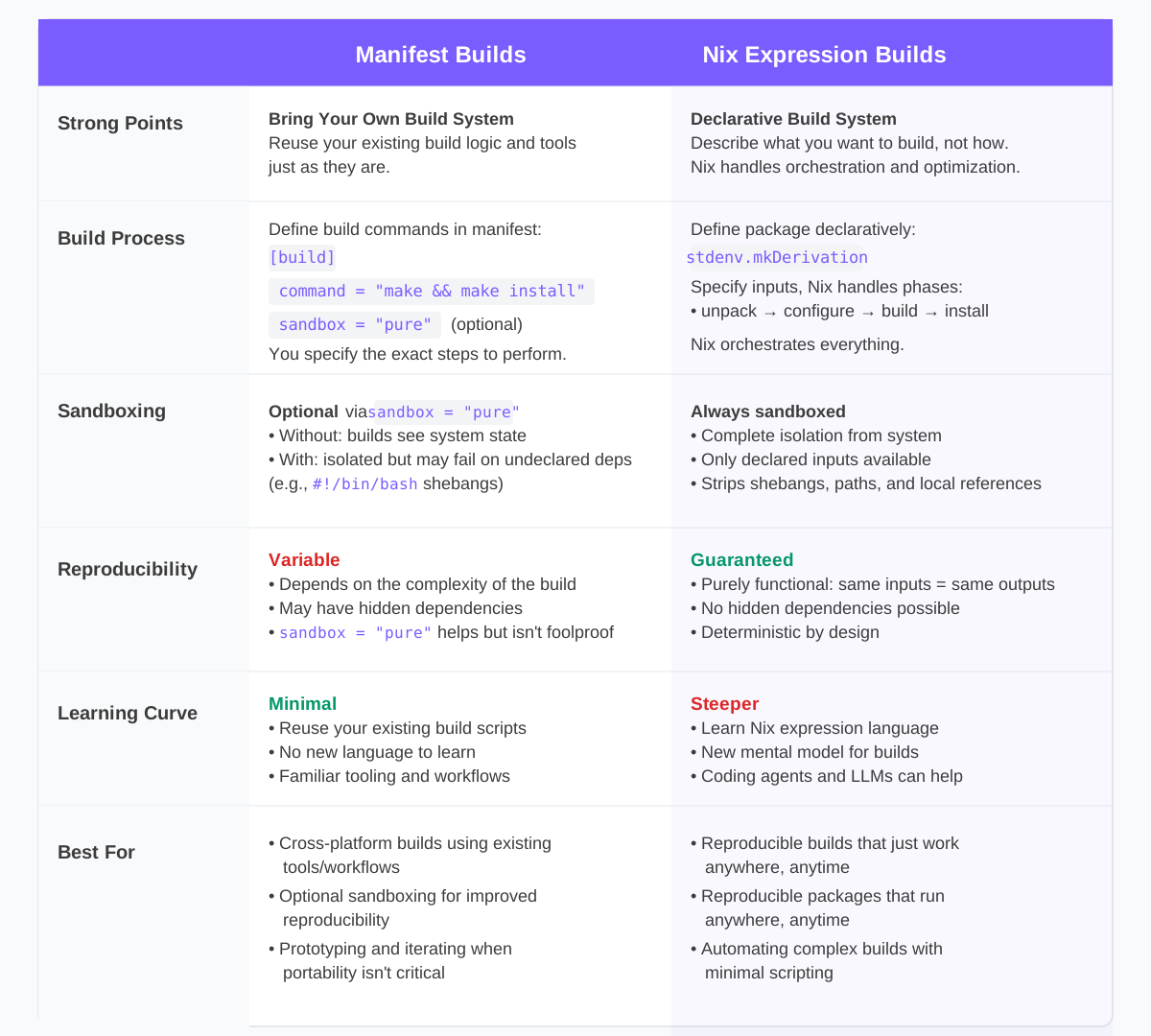
Neither mode is mutually exclusive; you can use both together. But why would you?
1.1 The Best of Both Build Experiences
Building in a sandbox is usually pretty straightforward with manifest builds on Linux, where Nix not only manages your toolchain, but provides GCC, libc, source headers, pkg-config files, and other build inputs. These dependencies get fetched as packages from the Nix binary cache (cache.nixos.org), so when Flox runs a sandboxed manifest build, it populates the sandbox using these Nix-provided packages.
On macOS, it’s different. Xcode, the Apple SDKs, and other core system frameworks aren’t managed by Nix. Builds outside the Nix sandbox inherit all of that Apple-provided state; inside_ the sandbox, however, this state is inaccessible, so you end up tracking down SDK and framework paths, wiring them through env vars like CC, CFLAGS, **LDFLAGS**, and SDKROOT. This is why defining a sandboxed Flox manifest build tends to be fairly simple on Linux, but can feel more than a little challenging on macOS.
There is another option, however. Flox builds with Nix expressions always run in a sandbox—and always just work. Anytime, anywhere.
Why? For a couple of reasons:
-
They’re strictly declarative. A Nix expression lets you declaratively specify the build you want Nix to perform. You’re basically telling Nix what should exist at the outcome (packages, artifacts, runtime environments), while delegating most of the step-by-step "how" mechanics to Nix's functional build machinery. When you declare a build with
stdenv.mkDerivation, Nix evaluates that expression into what it calls a derivation: a concrete build recipe that records your source (src), dependencies (buildInputs,nativeBuildInputs, and so on), and other build parameters. Nix then uses this derivation to construct a dependency graph and run through the build phases provided bystdenv. Nix figures out how to do this itself, managing sandboxing and caching, even parallelizing build tasks. -
They produce purely functional derivations. Because a derivation is the fully evaluated form of your Nix expression—with all its inputs (
src,buildInputs, flags, and so on) spelled out—Nix can treat it as a pure function. The same inputs always produce the same derivation, which always generates the same/nix/storepath, which always materializes as the same output bits. This same functional model is what powers Nix’s vaunted caching and sharing features: when Nix sees the same derivation again, it can safely skip rebuilding and reuse an existing artifact, whether it was built locally or fetched from a binary cache.
To get a feel for how and why these two build experiences differ, let’s walk through a few small “Hello World” examples expressed both as Nix expressions and as Flox manifest builds.
1.2 "Hello World!" in Two Different Build Languages
The following Nix expression defines a simple shell application named hello. This application uses Nix’s writeShellApplication helper function to print a greeting to the screen.
{ pkgs ? import
    (builtins.fetchTarball "https://github.com/NixOS/nixpkgs/archive/nixos-24.05.tar.gz")
    {}
}:

pkgs.writeShellApplication {
  name = "hello";
  text = ''
    echo "Hello World!"
    echo "This is a proof-of-concept Nix expression build."
    echo "Current date: $(date)"
  '';
}
The same build recipe expressed as a Flox manifest build looks like:
[install]
cowsay.pkg-path = "cowsay"

[build.hello-manifest]
description = "Simple Hello World - manifest build version"
version = "1.0.0"
command = '''
  mkdir -p $out/bin

# Create a simple hello script
  cat > $out/bin/hello-simple << 'EOF'
#!/usr/bin/env bash
echo "Hello World!"
echo "This is a proof-of-concept Nix expression build."
echo "Current date: $(date)"
EOF

  chmod +x $out/bin/hello-simple
'''
You can build both—at the same time!—by creating the required build definitions. Paste the first code example into a Nix expression in ./.flox/pkgs, paste the second into your Flox manifest. Running flox build produces two executables in ./result-hello/bin and ./result-hello-manifest/bin/.
The next Nix expression (below) changes things up. It, too, uses writeShellApplication, this time to print “Hello World” with stylized ASCII text rendering. The runtimeInputs array declares toilet—a modern clone of figlet that supports Unicode, color, and output effects—as a runtime dependency. This automatically makes toilet available in the script's PATH.
{ pkgs ? import
    (builtins.fetchTarball "https://github.com/NixOS/nixpkgs/archive/nixos-24.05.tar.gz")
    {}
}:

let
  inherit (pkgs) writeShellApplication toilet;
in
writeShellApplication {
  name = "hello";
  runtimeInputs = [ toilet ];
  text = ''
    toilet "Hello World!"
    echo "This is a proof-of-concept Nix expression build."
    echo "Current date: $(date)"
  '';
}
In Nix, a derivation is the declarative build recipe that produces a package. By overriding a derivation’s definition (Nix calls this its “attribute set”), you can change a package’s inputs or runtime behavior without redefining it from scratch.
For example, the following Nix expression takes a base hello package and uses Nix’s overrideAttrs helper to modify an existing derivation without duplicating its definition. The base hello script uses toilet. The override keeps that definition but injects an extra checkPhase that rewrites the generated script so it calls cowsay instead. If hello isn’t already built, Nix first builds it (or fetches it from cache), then applies the override and uses the resultant derivation wherever it’s referenced.
{ pkgs ? import
    (builtins.fetchTarball "https://github.com/NixOS/nixpkgs/archive/nixos-24.05.tar.gz")
    {}
}:

let
  inherit (pkgs) writeShellApplication toilet cowsay glibcLocales;

  # base package with toilet
  hello = writeShellApplication {
    name = "hello";

    # toilet for the base version, cowsay for the overridden one
    runtimeInputs = [ toilet cowsay ];

    # make Perl (and friends) happy on non-NixOS
    runtimeEnv = {
      LOCALE_ARCHIVE = "${glibcLocales}/lib/locale/locale-archive";
      LANG = "en_US.UTF-8";
    };

    text = ''
      toilet "Hello World!"
      echo "This is a proof-of-concept Nix expression build."
      echo "Current date: $(date)"
    '';
  };

  # override to use cowsay instead of toilet
  hello-cowsay = hello.overrideAttrs (final: prev: {
    checkPhase = ''
      ${prev.checkPhase or ""}

      substituteInPlace "$target" \
        --replace 'toilet "Hello World!"' 'cowsay "Hello World!"'
    '';
  });
in
hello-cowsay
There is no equivalent to overriding and repurposing an existing derivation with Flox manifest builds. Instead, you use imperative build logic to express how to produce the result you want.
For example, the following Flox manifest defines a small hello-manifest script that uses cowsay from the start; it achieves a similar effect to the override defined above, but it does so by spelling out the build steps directly in Bash instead of modifying a pre-existing package.
version = 1

[install]
cowsay.pkg-path = "cowsay"

[build.hello-manifest]
description = "Hello World with cowsay - manifest build version"
version = "1.0.0"
command = '''
  mkdir -p $out/bin

  # Create the hello script using cowsay
  cat > $out/bin/hello-manifest << 'EOF'
#!/usr/bin/env bash
cowsay "Hello World!"
echo "This is a proof-of-concept manifest build."
echo "Current date: $(date)"
EOF

  chmod +x $out/bin/hello-manifest
'''
All of this probably feels confusing and intimidating. But the good news is that LLMs and agentic AI tools thoroughly grok Nix and the Nix language. Each of the expressions above was developed and hardened by AI agents (Anthropic's Claude Code and OpenAI's Codex.) Agents won't necessarily get things exactly right the first time, but iterating across 2-3 prompts always produces workable results.
Agentic tools unlock the superpower of building and packaging software with Nix. Flox’s publishing features and the Flox Catalog enable you to turn those builds into shareable, runnable artifacts you can use anywhere, anytime.
2. Manifest vs. Nix Expression Builds Compared
Part 2 of this walk-through uses a real-world build target: ffmpeg for macOS.
Why ffmpeg? Because it's challenging software to build and package. Why macOS? Because it’s much simpler to build in a sandbox on macOS with Nix expressions than with Flox manifest builds. With Nix expressions, the Darwin toolchain, SDKs, and build flags are already encoded in nixpkgs as derivations (via stdenv and the darwin.apple_sdk stack), so Nix can materialize the appropriate toolchain, headers, and other declared inputs inside the sandbox. A Flox manifest build, by contrast, is kind of like a shim between your existing (typically imperative) build logic and Nix’s functional build machinery, so it’s up to you to reconstruct an equivalent build environment manually inside the sandbox.
2.1 A Flox Manifest Build using ffmpeg
Using Flox to build software on macOS outside a Nix sandbox is straightforward enough: first declare the dependencies you need from the Flox Catalog, then define a [build] recipe with the required build logic, and run flox build[1]. To build ffmpeg, your Flox manifest might define the following build recipe:
[build.ffmpeg-darwin]
description = "FFmpeg with rich support for audio codecs + containers"
version = "7.1"
command = '''
  set -euo pipefail

    CC=clang
    CXX=clang++
    export CC CXX

  ./configure \
    --prefix="$out" \
    --cc=clang \
    --cxx=clang++ \
    --enable-gpl \
    --enable-nonfree \
    --enable-libx264 \
    --enable-libx265 \
    --enable-libvpx \
    --enable-libmp3lame \
    --enable-libopus \
    --enable-libvorbis \
    --enable-libsoxr \
    --enable-libtwolame \
    --disable-libass \
    --disable-libaom \
    --disable-libsvtav1 \
    --disable-filter=fspp \
    --enable-encoder=dca \
    --enable-libbluray \
    --enable-libcdio \
    --enable-libdvdnav \
    --enable-libdvdread \
    --pkg-config-flags="--static" \
    --extra-cflags="-I$FLOX_ENV/include -O2" \
    --extra-ldflags="-L$FLOX_ENV/lib -Wl,-rpath,$FLOX_ENV/lib" \
    --extra-libs="-lpthread -lm -lz"

  make -j2

  make install

  mkdir -p "$out/lib"
There’s a little more to it than this, of course; if curious, you can view the complete Flox manifest here.
But will it run on other macOS machines? That is, if you build on an ARM-based Mac, will your software run on an x86 Mac? Maybe—but there’s no guarantee, because Flox’s manifest build machinery acts as a shim between your imperative build recipes (the inputs of which include whatever toolchains, SDKs, and environment variables happen to be “there” at build time) and Nix’s underlying functional build machinery.
If you want reproducibly guarantees, you need a Nix expression that Nix evaluates into a derivation and builds inside a sandbox, so the build is enforced as a pure function of its declared inputs.
2.2 A Flox ffmpeg Build Using Nix Expressions
This section shows you how to define a custom ffmpeg package that builds and runs anywhere.
On both Linux and macOS, sandboxed Flox manifest builds are harder than building outside a sandbox.
Conversely, building in a sandbox with Nix expressions … typically just works.
Ready to try it? There are just a few requirements to check off before we get started. You need:
- Flox version 1.6.0 or newer;
- A Flox project directory;
- A
pkgsdirectory at$PROJECT_DIRECTORY/.flox/pkgs; - At least one
<package_name>.nixfile inside that directory; - Packages defined in your Nix expression and packages declared as manifest builds can’t have the same names: you can’t have
helloinpkgsand a build definition calledhelloin your manifest; - All files in
.flox/pkgs/must be tracked by Git—added to the repository, though it need not be committed.
You can put as many Nix expressions as you like into pkgs. If you want, you can also combine manifest and Nix expression builds at the same time. This not only gives you a way to reuse your existing build scripts, but (with Nix expressions) makes it easier to address sandboxing edge cases or especially challenging builds. Plus, if you already use Nix and/or have custom Nix expressions of your own, you can reuse these too.
One other thing: if you’re only building with Nix expressions, you needn’t do anything with your manifest. Just run flox init to initialize a Flox environment, copy your Nix expression(s) into .flox/pkgs, and go.
Let’s get started. For this build example, we’ll take [the generic **ffmpeg**](https://github.com/NixOS/nixpkgs/blob/master/pkgs/development/libraries/ffmpeg/generic.nix) Nix expression from nixpkgs` and cut it down—from 1,024 lines to just 224. We’ll skip the work involved in doing this; the purpose of this example is to demonstrate building a complex project in a sandbox with Nix expressions.
You can copy this package.nix if you’d like to LARP-build on your own:
% flox build
Building ffmpeg-custom-7.0.2 in Nix expression mode
this derivation will be built:
  /nix/store/598wnnc6d8ww776mpq5w522aj9yka7h4-ffmpeg-custom-7.0.2.drv
building '/nix/store/598wnnc6d8ww776mpq5w522aj9yka7h4-ffmpeg-custom-7.0.2.drv'...                                                                              ffmpeg-custom> Running phase: unpackPhase                                                                                                                      ffmpeg-custom> unpacking source archive /nix/store/f3im09myi2w1v4m1bzmawz26hmir2xbc-source                                                                     ffmpeg-custom> source root is source                                                                                                                           ffmpeg-custom> Running phase: patchPhase
…
ffmpeg-custom> Running phase: configurePhase
ffmpeg-custom> patching script interpreter paths in ./configure
…
ffmpeg-custom> Running phase: buildPhase
ffmpeg-custom> build flags: -j4 SHELL=/nix/store/38rycfnr06w9iv5mq5cyjcwk6vi8bl8d-bash-5.2p37/bin/bash
…
ffmpeg-custom> Running phase: fixupPhase                                                                                                                       ffmpeg-custom> checking for references to /private/tmp/nix-build-ffmpeg-custom-7.0.2.drv-0/ in /nix/store/xrw4qp9qgw0ldgvcgyxvsd852c7cyf6w-ffmpeg-custom-7.0.2...                                                                                                                                                             ffmpeg-custom> gzipping man pages under /nix/store/xrw4qp9qgw0ldgvcgyxvsd852c7cyf6w-ffmpeg-custom-7.0.2/share/man/                                             ffmpeg-custom> patching script interpreter paths in /nix/store/xrw4qp9qgw0ldgvcgyxvsd852c7cyf6w-ffmpeg-custom-7.0.2                                            ffmpeg-custom> stripping (with command strip and flags -S) in  /nix/store/xrw4qp9qgw0ldgvcgyxvsd852c7cyf6w-ffmpeg-custom-7.0.2/lib /nix/store/xrw4qp9qgw0ldgvcgyxvsd852c7cyf6w-ffmpeg-custom-7.0.2/bin
Completed build of ffmpeg-custom-7.0.2 in Nix expression mode
✨ Build completed successfully. Output created: ./result-package####Note: The complete build output generated >5,000 lines; the "…" indicate abridged output.
Once you’re done, just run flox publish to publish your custom ffmpeg package to the Flox catalog.
Once it’s published, you can search, show information about it, or install it just like you would any package:
% flox search ffmpeg
barstoolbluz/ffmpeg         FFmpeg with full codec support
barstoolbluz/ffmpeg-linux   FFmpeg with rich support for audio codecs + containers
barstoolbluz/ffmpeg-darwin  FFmpeg with rich support for audio codecs + containers
ffmpeg                      Complete, cross-platform solution to record, convert and stream audio and video
ffmpeg_2                    A complete, cross-platform solution to record, convert and stream audio and video
ffmpeg_3                    A complete, cross-platform solution to record, convert and stream audio and video

% flox show barstoolbluz/ffmpeg-darwin
barstoolbluz/ffmpeg-darwin - FFmpeg with rich support for audio codecs + containers
    barstoolbluz/ffmpeg-darwin@7.1 (x86_64-darwin only)

% flox install barstoolbluz/ffmpeg-darwin
⚠️  'barstoolbluz/ffmpeg-darwin' installed only for the following systems: x86_64-darwin
This is just a minimal, customized ffmpeg build. If you want to, you could copy the complete 1,024-line ffmpeg Nix expression from nixpkgs and build that on macOS, too—inside a Nix sandbox. This would produce a closure (i.e., a package that includes ffmpeg and all its runtime dependencies) of larger than 1 GB.
Not only will it just build, it will just work when you go to run it—anywhere.
3. Nix Expressions: Helpful Resources and Context
If you don’t already use Nix and can’t speak the Nix language, why would you build using Nix expressions?
The most compelling reason is the hermetic reliability of the Nix sandbox: a Nix expression that “just builds” against a specific Git tag/release will always “just build” against that tag/release—across time (one year, five years, a decade from now) and space: locally, in a VM, in the cloud. When you build with Nix expressions, you’re completely decoupling your builds from the specifics and vicissitudes of languages and toolchains.
By contrast, whether they run inside or outside a sandbox, Flox manifest builds always pass imperative build steps to Nix; while convenient, this pattern does not give you the functional automaticity of Nix expressions.
Learning the Nix language isn’t easy, but Nix provides a few affordances to help you get started:
-
If you’re defining custom builds of software in
nixpkgs. You can reuse and adapt upstream expressions—just like we did withffmpeg. The beauty of this is that upstream maintainers have already figured out the dependencies and steps required to build on every platform their packages support. This gives you a reliable way to build, publish, and reuse custom, lean versions of upstream Nix packages across your projects. -
If you're writing Nix expressions for software builds. Nix provides an assortment of helpers for common builds and language frameworks. So instead of authoring
stdenv.mkDerivationboilerplate, you can rely on pre-built wrappers designed for each language ecosystem. Wrapper functions likerunCommandandrunCommandCCare lightweight derivation generators built on top ofstdenv.mkDerivation; these inherit all the standard build infrastructure that Nix sets up automatically. The upshot: you don’t need to write it yourself. -
If you need to sanitize your build outputs. Nix and Nixpkgs provide a variety of post-install hooks and tools—like patchShebangs and removeReferencesTo—designed to make your build artifacts platform- and environment-agnostic. For example, defining a
removeReferencesTostep in your Nix expression strips build-time references from your package, like absolute paths to build dependencies (e.g.,/nix/store/7lq8m3s0d2h9rjv4k5c6bn1pxafyzwga-gcc-13.2.0/bin/gcc), compiler and/or toolchain paths (GCC, especially, tends to inject local state into artifacts), and other environment-specific details.
One other important note: coding agents aren’t at all bad at Nix expressions; working with Cursor, Copilot, or Claude Code can usually get you 95% or more of the way to a working Nix expression. Debugging with them in follow-up prompts almost always does the rest.
4. That’s a Wrap
Whether you’re building with manifest recipes or Nix expressions, Flox lets you reuse your existing build logic while gaining the benefits of fully reproducible builds. You can start simple—by packaging an internal tool or scripting a one-off build—and create more complex declarative pipelines over time.
If you’re curious to see how reproducible builds fit into your own work, try git clone-ing and building a few Nix expressions on your own. Then run flox publish to publish what you've built to the Flox Catalog. From there, you and your teammates can easily pull and use your packages by defining them in shareable, reproducible Flox environments. FloxHub makes it easy to publish, version, audit, and remotely run environments, as well as control who uses them. You can even switch/roll back between generations—all in one place.
[1] ####Note: This build example makes major customizations to the upstream ffmpeg package. We pin to a specific version to proactively insulate against upstream changes and keep our build reproducible. The recommended best practice for customizing Nix packages is to define overrides for the specific parts you plan to modify. If, however, you need to make significant changes, or if the package is being removed from nixpkgs upstream, it makes sense to copy the package’s expression and then modify it to fit your needs.