





Blog
Production Model Serving Using NVIDIA Triton, vLLM, and llama.cpp with Flox
Steve Swoyer | 16 March 2026

You can use Flox to define declarative, reproducible model serving environments for NVIDIA's Triton Inferencing Server, NVIDIA TensorRT, vLLM, and llama.cpp. Platform teams can use the same Flox environments to (1) serve models uncontained on Kubernetes GPU nodes; (2) emit distroless reproducible containers; (3) run jobs in CI or prod from VMs, or (4) run workloads directly on bare metal.
Regardless of how, when, or where you run it, the same Flox environment travels across the SDLC:
- On developers' CUDA-accelerated laptops and desktops;
- On NVIDIA DGX Spark locally;
- On Slurm-managed CUDA GPU clusters for research, eval, and batch inference;
- On Kubernetes CUDA GPU clusters, or on VMs, for eval and prod.
Unlike a Dockerfile-first workflow, where the OCI image is the thing you build, tag, and promote, Flox makes the declarative environment the unit of promotion. Teams ship Flox environments from local dev to eval, test them in CI, and deploy them to prod. Changes are atomic edits to the environment, committed to Git or published to FloxHub as a new generation. Rollbacks are either switching the environment back to an earlier Flox generation, or in GitOps flows, changing the deployed reference to an earlier Git commit.
This guide walks through three validated Flox environments for enterprise model serving: NVIDIA's Triton Inference Server (with five backends, including TensorRT and TensorRT LLM), vLLM, llama.cpp.
It also explores a reproducible Flox ComfyUI environment for image serving, along with a turn-key Flox environment that apps and services can call to prompt the ComfyUI API.
The last part of this guide explores Flox environments for model requantizing (for Huggingface, GGUF, and TensorRT-LLM model serving) that are optimized for local dev and production use. Each of these model-serving backends is picky about the model formats, quantization schemes, and runtime artifacts it will accept, so reusing models across backends often requires requantization.
Flox Triton Server model serving runtime
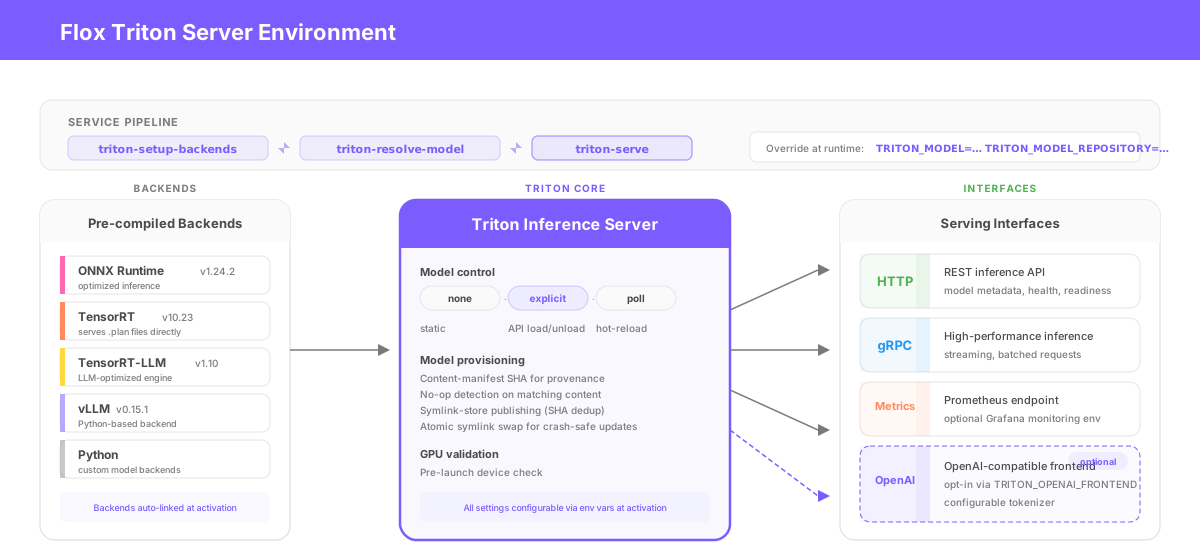
The Flox Triton Server environment runs NVIDIA Triton v2.66.0 with precompiled backends for Python, ONNX Runtime, NVIDIA TensorRT, and vLLM v0.16.0. Backend packages are versioned 2.66.0 to match the Triton release. The vLLM backend is wired into Triton as a Python-based backend, per NVIDIA's guidance. The environment exposes HTTP, gRPC, and Prometheus metrics on separate ports, with an OpenAI-compatible frontend enabled by default on port 9000. It can also serve TensorRT .plan engines through Triton's compiled-in TensorRT backend; no container sidecar is required. A separate environment provides Prometheus-backed Grafana monitoring. The Flox triton-flox-runtime-tensorrtllm environment provides a proof of concept for serving Microsoft's Phi-4-Mini-Instruct model via NVIDIA's TensorRT-LLM backend. It is preconfigured with a TensorRT-LLM engine built for NVIDIA's SM120 (Blackwell / Vera Rubin) architecture. Note: TensorRT-LLM deployments require model conversion and engine builds targeted to the GPU architecture on which they will run. This environment will only run on SM120.
How to use it
Start the server:
flox activate -s -r floxrox/triton-flox-runtimeThe service pipeline chains two packaged scripts, triton-resolve-model and triton-serve, with a packaged setup script (triton-setup-backends) to assemble the backend directory at activation.
You can override the model and repository at runtime:
TRITON_MODEL=my-model TRITON_MODEL_REPOSITORY=/data/models flox activate -sThe OpenAI-compatible frontend is enabled by default (TRITON_OPENAI_FRONTEND defaults to true). Set TRITON_OPENAI_FRONTEND=false to disable it and use only the standard Triton HTTP/gRPC/metrics endpoints. The tokenizer for the OpenAI frontend is auto-resolved from the model's model.json configuration; for custom models without a model.json or tokenizer/ directory, you can set TRITON_OPENAI_TOKENIZER explicitly (e.g., TRITON_OPENAI_TOKENIZER=microsoft/Phi-4-mini-instruct). Model control modes span none (static), explicit (API-driven load/unload), and poll (hot-reload from the repository). The environment wires up Triton backends automatically: it links in packaged backends and adds the Python entrypoints needed for repo-local custom backends, so operators don't have to do this themselves.
Defense-in-depth runs deep. A preflight script performs a scan of /proc/net/tcp and /proc/net/tcp6 for HTTP, gRPC, metrics, and OpenAI ports, returning 7 distinct exit codes for programmatic error handling. Artifact validation is backend-aware: ONNX models are checked with onnx.checker.check_model(), PyTorch artifacts are inspected for magic bytes, and Python backends are syntax-compiled; all of this takes place before Triton server ever loads them. Every resolved model gets a content-manifest SHA; re-runs compare provenance and skip downloads when local content already matches (i.e., no-op detection). The symlink-store publishing strategy stores model content under .published/<model-name>/<manifest-sha>/, with the model repository target becoming an atomic symlink swap. This provides per-model deduplication and crash-safe updates in one mechanism. Per-model flock locks use PR_SET_PDEATHSIG so the lock releases if the parent dies, with bounded polling and symlink rejection on lock files.
The README.md for this environment is copiously documented. You (or your AI agent) can view it here.
Flox vLLM model serving runtime
The Flox vLLM environment packages vLLM into a reproducible inference runtime that runs directly on x86-64 Linux, without needing a container. It gives you a consistent way to provision models from local storage, cache, Hugging Face, or R2, validate them, and launch an OpenAI-compatible serving endpoint with built-in GPU checks, port handling, and startup scripts. It's most useful for teams that want a simpler, more inspectable way to run high-performance LLM inference while maintaining strong operational controls vis-a-vis model loading, config, and service management. It is especially helpful when you need container-free deployment but still need a repeatable path to serving models reliably on NVIDIA GPUs.
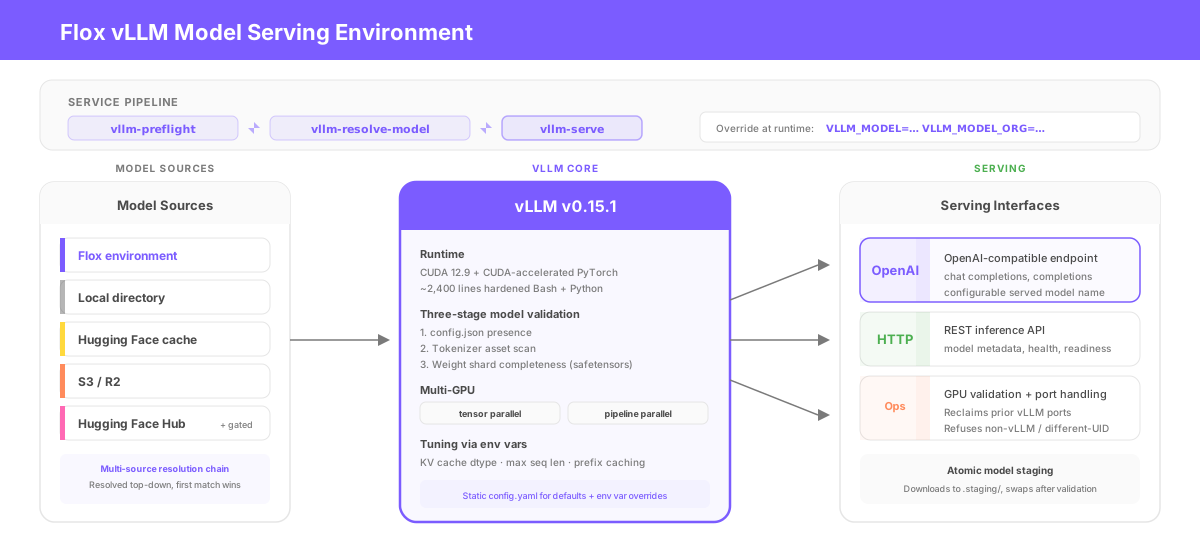
The vLLM environment ships a production-ready vLLM v0.15.1 inference server on CUDA 12.9. It consists of two packages: vllm (built against CUDA-accelerated PyTorch) and vllm-flox-runtime, roughly 2,400 lines of hardened Bash and Python orchestration split across three service stages.
How to use it
You can start serving with a single command:
flox activate -s -r floxrox/vllm-runtimeThe service pipeline chains three packaged scripts, vllm-preflight, vllm-resolve-model, and vllm-serve. You can inject environment variables that override the model at activation time:
VLLM_MODEL=Qwen2.5-7B-Instruct VLLM_MODEL_ORG=Qwen flox activate --start-servicesMulti-GPU inference is likewise just a matter of injecting an env var; e.g.: VLLM_TENSOR_PARALLEL_SIZE=2 for tensor parallelism; VLLM_PIPELINE_PARALLEL_SIZE=2 for pipeline parallelism. You can download gated models at runtime, assuming HF_TOKEN is set; you can also inject environment variables to dynamically download models from other sources, including local or remote caches, S3, and R2. KV cache dtype, max sequence length, prefix caching, and served model name are all configurable as environment variable overrides. The Flox environment ships with a static config.yaml for defaults that rarely change.
The runtime enforces defense-in-depth at every stage. The preflight stage scans /proc/net/tcp and attributes port owners by tracing socket inodes through /proc/<pid>/fd; it will reclaim a port held by a prior vLLM process but refuse to touch a non-vLLM listener, or one owned by a different UID. Model provisioning resolves through a multi-source chain (Flox environment → local directory → HuggingFace cache → S3/R2 → HuggingFace Hub), then runs three-stage validation: checking for the presence of config.json, scanning tokenizer assets, and assessing weight shard completeness with safetensors header checks. Downloads stage atomically into .staging/ and swap into place only after validation passes. The default env file parser is a restricted Python-based safe mode that rejects shell interpolation and command substitution; trusted mode requires opt-in via VLLM_ENV_FILE_TRUSTED=true.
The README.md for this environment is quite thorough. You (or your AI agent) can view it here.
Flox llama.cpp model serving runtime
The Flox llama.cpp model serving environment packages llama.cpp into a reproducible runtime for x86-64 Linux; no containers required. It's designed for serving GGUF-quantized models via llama-server, with built-in handling for model download and validation, GPU checks, port reclaim, startup orchestration, and an OpenAI-compatible API. It's especially useful for teams that want a lightweight, inspectable way to run fast local or production inference without the dependencies of a complete PyTorch- or vLLM-based stack.
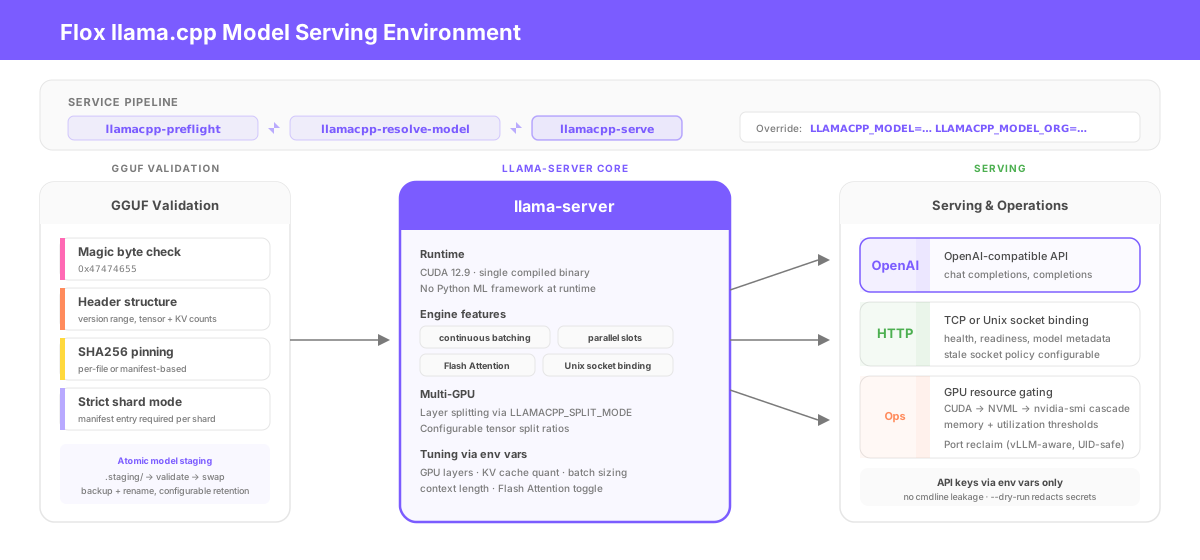
The llama.cpp environment serves models via llama-server pinned to CUDA 12.9. It's a single compiled binary with no Python ML framework dependency at runtime. It supports continuous batching, parallel inference slots, and Flash Attention, along with both TCP and Unix socket binding.
How to use it
You can start serving by running:
flox activate -s -r floxrox/llamacpp-runtimeThe service pipeline chains three packaged scripts: llamacpp-preflight, llamacpp-resolve-model, and llamacpp-serve. You can override the default model like so:
LLAMACPP_MODEL=DeepSeek-R1-0528-Qwen3-8B-Q4_K_M LLAMACPP_MODEL_ORG=bartowski flox activate --start-servicesMulti-GPU layer splitting works via LLAMACPP_SPLIT_MODE=layer and LLAMACPP_TENSOR_SPLIT="0.5,0.5". Unix socket mode is LLAMACPP_HOST=/var/run/llamacpp/server.sock, with configurable stale socket policies. You can tune the engine (for GPU layer offload, KV cache quantization, batch/ubatch sizing, context length, Flash Attention, and other settings) by setting environment variable overrides.
The runtime validates every GGUF file it touches, performing magic byte checks (0x47474655), header structure parsing (for version range and tensor/KV counts), and optional SHA256 pinning per file or via a manifest. Strict mode requires a manifest entry for every shard in split model sets. API keys are exported as env vars, never placed on the command line (this prevents /proc/<pid>/cmdline leakage), while --print-cmd and --dry-run redact secrets automatically. When running as root (e.g., in a container or VM) the lock directory cascade refuses /tmp and requires /run or /var/lock.
The server won't start if the GPU can't handle the load: GPU resource gating uses a three-tier detection cascade (CUDA driver probe → NVML → nvidia-smi) with runtime-configurable fail thresholds for free memory and utilization percentage. Model downloads stage into .staging/, validate, then swap into place via backup+rename, with old backups pruned to a configurable retention count.
The README.md for this environment is prodigiously detailed. You (or your AI agent) can view it here.
Flox ComfyUI image serving runtime
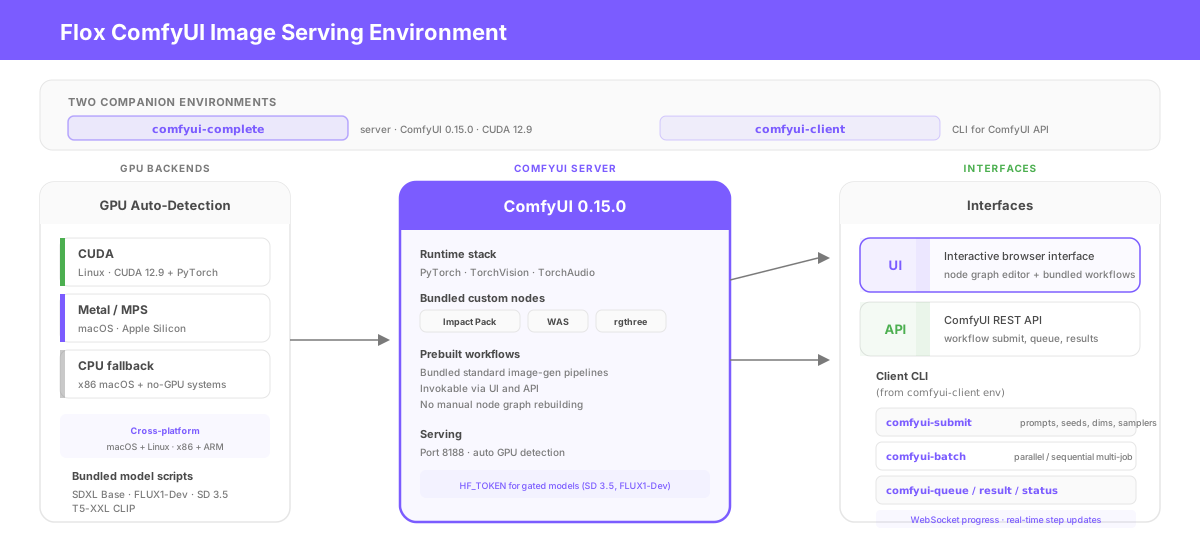
The Flox ComfyUI environment gives you a reproducible ComfyUI runtime that works without containers. It supports both ComfyUI's interactive UI and API-based serving, and includes bundled, prebuilt workflows that can be invoked via both the browser interface and the API so teams can prompt standard image-generation pipelines without manually rebuilding node graphs each time. It runs across macOS and Linux, including x86 and ARM systems, with GPU acceleration where available—Metal/MPS on macOS and CUDA on Linux—while also supporting CPU-only deployments. That makes it useful for teams that want one consistent way to build, publish, and operate ComfyUI across laptops, workstations, and servers.
Two companion environments cover the ComfyUI image generation stack. The server environment ships ComfyUI 0.15.0 on CUDA 12.9 with PyTorch, TorchVision, TorchAudio, and a bundle of custom nodes (Impact Pack, WAS, rgthree). The Flox ComfyUI client environment provides a CLI for the ComfyUI API: comfyui-submit sends workflows with specifiable parameter overrides (prompts, seeds, dimensions, samplers); comfyui-batch runs parallel or sequential multi-job runs; and comfyui-queue, comfyui-result, and comfyui-status manage jobs and retrieve images. WebSocket progress tracking gives real-time sampling step updates in the terminal.
How to use it
You can start by running:
flox activate -s -r floxrox/comfyui-completeThis runs ComfyUI server on port 8188 with automatic GPU detection: the environment detects the presence of (and loads the appropriate dependencies for) CUDA on Linux and MPS on Apple Silicon, with CPU fallback on x86 MacOS and systems on which GPU acceleration isn't available. It also bundles scripts you can use to download models, including SDXL Base, FLUX1-Dev, Stable Diffusion (SD) 3.5, and T5-XXL CLIP. You'll need to set your HuggingFace token to download SD 3.5 and Flux1-Dev.
To prompt ComfyUI via its API, run the following command:
COMFYUI_HOST=192.168.0.42 COMFYUI_PORT=8188 flox activate -r floxrox/comfyui-client -- sdxl-txt2img -p "a cyberpunk city street at night straight outta john rechy's city of night" -o ./outputYou can also batch prompt by passing ComfyUI a JSON job file:
flox activate -r floxrox/comfyui-client -- comfyui-batch batch-demo.json -W "$FLOX_ENV/share/comfyui-client/workflows/api/flux/flux-txt2img.json" --parallel -o ./outputThe JSON might look like this:
[
  {
    "prompt": "a Japanese temple garden in autumn, red maple leaves floating on a koi pond, morning mist",
    "seed": 100,
    "steps": 25,
    "cfg": 1.0
  },
  {
    "prompt": "a steampunk airship docked at a floating island, copper and brass details, cumulus clouds at eye level",
    "seed": 200,
    "steps": 25,
    "cfg": 1.0,
    "width": 1024,
    "height": 768
  },
  {
    "prompt": "macro photograph of a dewdrop on a spider web, prismatic light refraction, bokeh background",
    "seed": 300,
    "steps": 20,
    "cfg": 1.0
  }
]
Other model-serving essentials
Flox Model Quantizer runtime environment
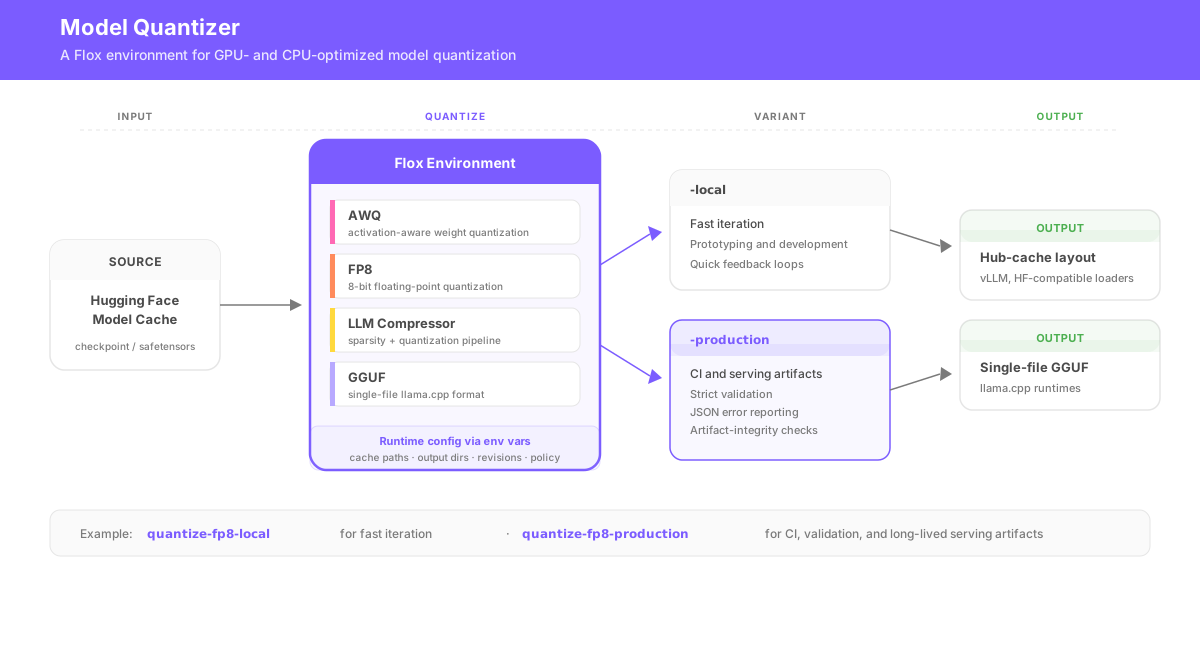
This Flox environment reads source models from a Hugging Face cache and writes quantized outputs either in hub-cache layout for vLLM and other Hugging Face-compatible loaders or as single-file GGUF artifacts for llama.cpp-based runtimes. For each quantization path (AWQ, FP8, LLM Compressor, GGUF), it provides both -local and -production command variants. For instance, quantize-fp8-local is designed for fast iteration; it's useful when working or prototyping locally. By contrast, quantize-fp8-production adds strict validation, strong locking, structured JSON error reporting, and artifact-integrity checks for CI and long-lived serving artifacts.
Why requantize? For several reasons. Production serving stacks typically impose backend-specific artifact requirements: for example, a Hugging Face checkpoint typically needs to be converted to GGUF before it will run in llama.cpp; the same checkpoint may need to be requantized, then converted into a TensorRT-LLM-compatible checkpoint, before a TensorRT engine can be built. (Pro Tip: You can use this Flox environment to build TensorRT engines from TensorRT-LLM-compatible Hugging Face checkpoints.)
The environment supports runtime configuration via environment-variable injection. This means you, AI agents, CI pipelines, etc. can specify cache locations, output paths, revisions, policy controls, and other minutiae at activation or execution time without hard-coding changes. x86-64 Linux only.
Note: Models and model servers are incredibly finicky. The best way to use the Flox Model Quantizer environment locally is to pair it with an AI agent, delegating to the agent the task of iteratively debugging runtime conversion issues.
Flox TensorRT-LLM model conversion/engine building environment
This Flox environment packages the tools and libraries you need to convert Hugging Face models into TensorRT-LLM checkpoints → compile these checkpoints into TensorRT engines for LLM model serving with NVIDIA's Triton Inference Server.
The environment bundles tools for benchmarking, evaluation, pruning, refitting, and local serving, so it can also be used to validate engines before promotion into a Triton model repository. Run these models using the companion Flox Triton Server runtime.
This workflow is often the second step in a bigger TensorRT model-prep pipeline. Hugging Face source checkpoints frequently need to be quantized / rewritten into the form expected by the TensorRT-LLM conversion path. The model weights or intermediate checkpoint may be reusable, but the final TensorRT engine is almost always target-specific: i.e., built for the GPU architecture on which it will run. The Flox model-quantizer environment gives you a way to transform these models into TensorRT-LLM-backend-compatible quantized artifacts before they enter the checkpoint-conversion and TensorRT engine-build workflow. x86-64 Linux only.
Get Started
Every Flox environment featured in this guide, from NVIDIA Triton and vLLM to llama.cpp, ComfyUI, and the model quantization toolchain, runs from a single flox activate [-s] command.
With Flox, the declarative environment is the unit of promotion: the same Flox environment that runs on a developer's laptop runs in CI, on Slurm clusters, with or without containers on Kubernetes GPU nodes, or in VMs/AMIs. Instead of promoting multi-gigabyte images, you promote <100KB of artifacts: a Flox manifest and the lockfile that pins versions of the packages defined in it. Flox environments travel with your code in Git workflows, or can be pulled and activated on-demand from FloxHub. Deploying or rolling back is as simple as switching a pinned reference to a Git commit or a FloxHub generation.
Flox makes it easy to build, package, and publish GPU-specific versions of vLLM, llama.cpp, and other model serving runtimes (like SGLang). GPU-specific builds compile against a single NVIDIA SM architecture instead of shipping fat binaries that target every supported GPU generation. You get better performance because the compiler can emit instructions optimized for the exact hardware you're running on, smaller binaries because you're not shipping code paths for GPUs you'll never use, and more reliable reproducibility because the build is pinned to a specific SM, CUDA, and Python combination.
It also helps you keep older hardware in production. A generic vLLM build might target SM 80+ and leave your older Tesla T4 GPUs behind; a GPU-specific build lets you target exactly what you have.
The Flox CUDA Kickstart program helps you customize and implement these patterns for your own AI/ML CUDA workloads. To get started, sign up here, or explore FloxHub and start downloading pre-built Flox environments for agentic development, enterprise-grade production inferencing, model requantization, and other use cases.