





GPU-Optimized PyTorch Builds Made Easy with Flox and Nix

Flox makes it easy to build, package, and publish targeted, GPU-specific builds of NVIDIA CUDA dependencies like PyTorch, MAGMA, the ONNX Runtime, and so on. But why would you want to do that?
- Shrink the size of your PyTorch wheels. Generic PyTorch pulls in support for almost a dozen different CUDA architectures, plus Intel- and Apple-specific GPU and CPU builds.
- Get better performance + reduce your attack surface. Compiling for the hardware and libraries you actually run improves performance; the fewer unused backends + code paths you ship, the less is exposed.
- Ship one pinned artifact everywhere. Publish targeted builds for dev, CI, and production, rather than using whichever upstream PyTorch packages happen to exist. Prototype and train using GPUs in research, optimize for CPU inferencing in eval, run minimal, CPU-optimized PyTorch builds in production.
The best reason of all is that building with Flox is … simple. Just fire up your preferred AI coding tool, install the Flox MCP server, and instruct the agent(s) to author targeted, GPU-/CPU-specific build recipes. Publish the packages to your Flox Catalog; define them in declarative, reproducible Flox environments; and run them on bare metal, in VMs, or uncontained on Kubernetes. You can even use declarative Flox environments to build minimal OCI images, too.
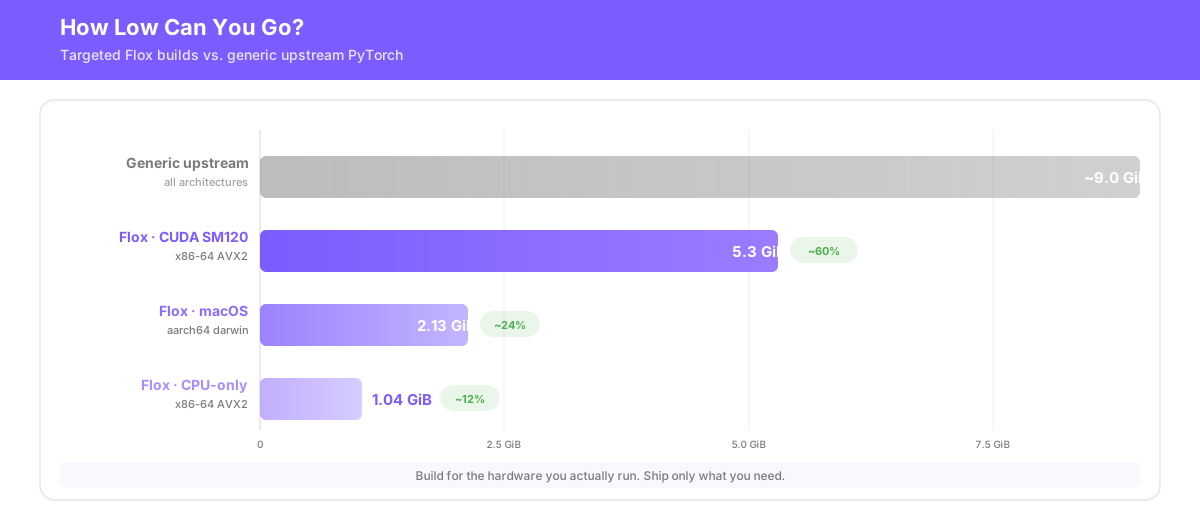
This guide walks you through how to use Flox to build, package, and publish GPU- and CPU-optimized software. It uses PyTorch as an example, building a CUDA-accelerated PyTorch runtime that's about 60% the size of the PyTorch runtime in nixpkgs. On macOS/darwin it's less than one-quarter the size of upstream PyTorch: 2.13 GB. CPU-only builds are even smaller: just over 1.0 GB.
Why build, package, and publish with Flox?
Flox is built on open source Nix, a reproducible build system. Nix defines build recipes as code and treats each build as a pure function of its declared inputs. This means build recipes (i.e., Nix expressions) behave reproducibly across space (i.e., compatible OS/CPU combinations) and time: the same Nix expression just works one month, one year, even five years after testing.
With Flox, as with Nix, you get portable, reproducible builds, across Linux, macOS, and Windows (with WSL2), on both x86 and ARM. Flox supplements Nix in that it gives you a way to publish packages to a private cache and catalog, define them in a declarative manifest, and install them anywhere.
What you need to get started
- Flox CLI and the Flox MCP server
- An AI coding tool with MCP support (Claude Code, Cursor, Windsurf, etc.)
- Your target hardware: NVIDIA GPUs for CUDA, Apple Silicon for MPS, or any machine for CPU-only
You'll follow one of three paths depending on your hardware: NVIDIA CUDA, Apple Metal/MPS, or x86/ARM CPU-only. Across all three paths, the workflow looks the same:
- Tell the agent what you're targeting;
- Answer any required questions as the agent authors the Nix build expression;
- The agent runs
flox buildagainst the Nix expression and tests that PyTorch builds + works; - Use
flox publishto publish the built PyTorch package to your private Flox Catalog.
Pro Tip: Clone this GitHub repo if you want to skip the agentic workflow and build using tested GPU-specific PyTorch Nix expressions. Building PyTorch can and will take hours on a laptop or small system (e.g., Mac Mini); to skip the build altogether and install prebuilt GPU-/CPU-specific Pytorch packages, jump to the end of this article.
Before you build: know your target
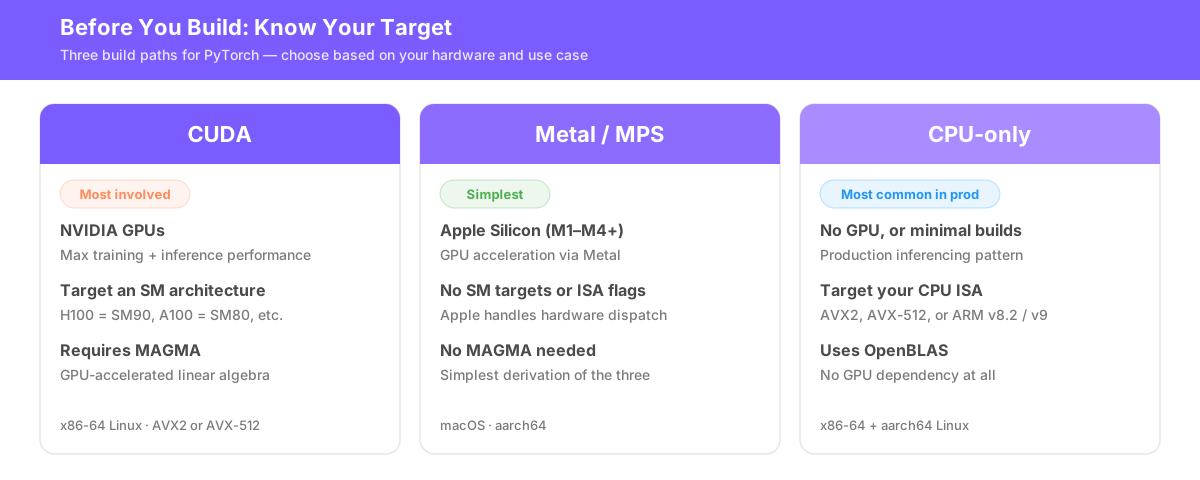
CUDA. Build for CUDA if you have NVIDIA GPUs and want maximum training or inference performance. You'll target a specific SM architecture (H100 = SM90, RTX 4090 = SM89, A100 = SM80) and a CPU ISA (AVX2, AVX-512, etc.). This is the most involved path because it starts with building MAGMA, a GPU-accelerated linear algebra library that PyTorch depends on.
Metal/MPS. Build for MPS if you're on Apple Silicon (M1–M4+). PyTorch's MPS backend uses Apple's Metal framework for GPU acceleration. You don't need MAGMA, and you don't need to set CPU ISA flags; Apple manages hardware dispatch internally. This produces the simplest derivation of the three.
CPU-only. Build for your specific CPU architecture if you don't have a GPU, or you want a minimal build for production inferencing. (This is one of the most common serving patterns in production environments.) Target for x86-64: AVX2 on laptops; AVX-512 on production/cloud infrastructure; ARM v8.2 or ARM v9 on aarch64. Use OpenBLAS for linear algebra. Works on both x86-64 and ARM Linux.
Step 1: Build MAGMA (CUDA-only)
Note: MPS and CPU-only builds don't use MAGMA; for these, skip to Step 2.
PyTorch depends on MAGMA for GPU-accelerated dense linear algebra. The default magma-cuda-static package in nixpkgs builds for every CUDA architecture at once, producing a ~10-GB closure. If you're running locally on an RTX 4090 or RTX 5090, or deploying to H100s, you don't need Pascal and Turing code compiled in alongside Hopper and Blackwell. So why not skip unnecessary architectures?
Tell the agent:
Create a pinned parametric Nix recipe that builds MAGMA as a **static** library for a single GPU target (Vera Rubin / SM120) with AVX2 CPU flags, using nixpkgs with a `cudaPackages_12_9` overlay. Override upstream `magma` with `cudaSupport = true; static = true;`, restrict `CMAKE_CUDA_ARCHITECTURES` to just `"120"`, and set `MIN_ARCH` to `"1200"`. This package will be passed as custom MAGMA into a follow-on PyTorch build.When the agent finishes, a sample wrapper should look something like this:
# pkgs/magma/h100-avx2.nix
{ callPackage }:
callPackage ../../builders/magma.nix { cpuTarget = "avx2"; gpuTarget = "sm90"; }
Now run flox build to build MAGMA. This realizes (i.e., builds) the output in the Nix store, which the GPU-specific PyTorch build in Step 2 will use.
flox build magma-cuda12_9-sm90-avx2MAGMA doesn't take as long to build as PyTorch, but it's still a demanding package. Expect 20-30 minutes on a beefy machine (e.g. ThreadRipper 7970x) … or 80-90 minutes on a standard desktop. The result is a ~100 MB static library: one architecture, statically linked, ready to plug into PyTorch.
Step 2: Author the PyTorch Nix expression
All three variants derive from the same upstream nixpkgs package definition, python3Packages.torch, and customize it via overrides. The agent reads the upstream Nix expression, identifies the supported override points, and writes the variant-specific recipe. You can provide a specific hardware target, or tell the agent to build for the hardware on your local system.
CUDA
To build CUDA-accelerated pytorch, use a prompt like this one:
Build a CUDA PyTorch Nix expression for SM120 + AVX2, using the same pinned nixpkgs + CUDA 12.9 overlay as the `magma` build. Start from `python3Packages.torch`, set `cudaSupport = true`, restrict `gpuTargets` to `["12.0"]` (dot notation), and pass the custom `magma` from the previous step via `effectiveMagma`. Use `overrideAttrs` to inject AVX2 CPU flags (`-mavx2 -mfma -mf16c`), set `ninjaFlags = ["-j32"]`, and name it `pytorch-sm120-avx2`. **Strip the build-time toolchain from the runtime closure** using `disallowedReferences` for `stdenv.cc` and `stdenv.cc.cc`, plus a `postFixup` that runs `remove-references-to` on both `$out` and the `$lib` output for gcc, gcc-wrapper, binutils, and binutils-wrapper. Build, test `import torch`, debug until it works.The CUDA path uses a two-stage override. .override sets cudaSupport = true, constrains gpuTargets to the SM (i.e., GPU) architecture you specify, and swaps in the GPU-specific magma via the override point nixpkgs exposes for this purpose. The agent defines .overrideAttrs to add CPU ISA compiler flags, tune build parallelism, and declare package metadata so the Nix store path reads pytorch-sm90-avx2-2.9.1. The agent pins the same nixpkgs revision and CUDA overlay used by magma, so both share an identical dependency tree.
Tell the agent iteratively to build, test, and debug until it has a working build. Debugging usually takes just a few minutes, but building GPU-specific pytorch will take some time: from 30 minutes on a beefy system to 3-4+ hours on a laptop. Once finished, publish to your private Flox Catalog and install anywhere:
flox publish pytorch-sm120-avx2The resulting closure clocks in at just over 6 GB, about one-third the size of the upstream PyTorch package. We can and will make this smaller by stripping unnecessary build dependencies.
Metal/MPS
To build MPS-accelerated pytorch, use a prompt like this one:
Produce a PyTorch package for `aarch64-darwin` that uses the upstream nixpkgs MPS path.

Inspect the pinned nixpkgs revision's `python3Packages.torch` expression on Darwin. Upstream exposes a unified `torch` package with conditional accelerator paths, enables `USE_MPS` on Darwin, and only exposes Darwin when `cudaSupport` and `rocmSupport` are off. Reuse this expression unless inspection of the pinned revision shows it needs a Darwin-specific fix.

If upstream is suitable, package and build it as `pytorch-darwin-mps.nix` without forking the recipe.

If the pinned revision needs a fix, write the smallest Darwin-only override necessary to preserve the upstream shape while keeping the Darwin/MPS path intact. Do not add CUDA, ROCm, or MAGMA-specific changes. After choosing the expression, build, debug build errors, and verify with:

- `python -c 'import torch; print(torch.backends.mps.is_built())'`
- `python -c 'import torch; print(torch.backends.mps.is_available())'`

Report whether upstream was reused or patched, and explain each override briefly.
On Apple Silicon, the agent should inspect the pinned upstream python3Packages.torch expression first. Currently, the nixpkgs upstream enables MPS on Darwin and excludes CUDA/ROCm, so the likely path is simply to reuse the pinned upstream expression and verify MPS at runtime, not to author a new MPS-specific override. Override happens only if the pinned nixpkgs revision fails to build.
Again, the agent will build and debug until it has a working build. Debugging takes just a few minutes, but building MPS-specific pytorch can take a considerable amount of time: from 30 minutes on a beefy system to 3-4 hours on a laptop. Once finished, publish to your private Flox Catalog and install anywhere:
flox publish pytorch-darwin-mps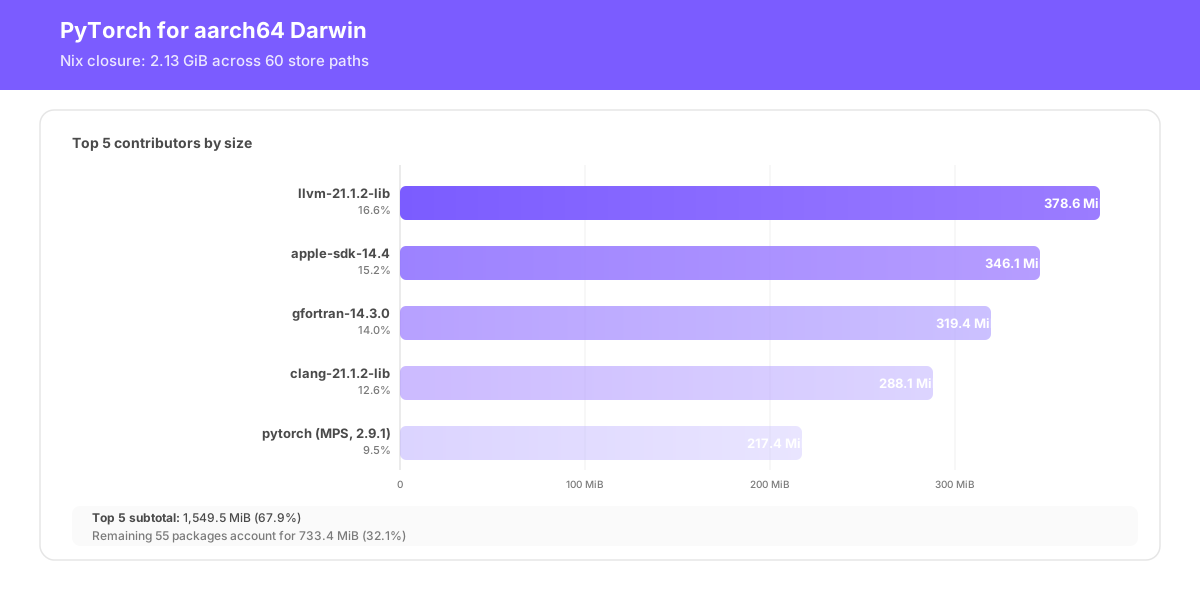
CPU-only
CPU-only PyTorch inference serving is still a common pattern in production. Companies train smaller models then tune them to perform on enterprise-grade CPUs, usually against AVX-512 or ARM v9 ISAs.
To build CPU-only pytorch, use a prompt like this one:
Produce a CPU-only PyTorch package for `avx2` on `x86_64-linux` from the pinned nixpkgs revision.

Inspect the upstream pinned `python3Packages.torch` expression first and keep the upstream CPU path: `cudaSupport = false` and `rocmSupport = false`. Reuse the upstream dependency shape unless inspection shows a fix is needed. Keep the normal CPU BLAS/MKLDNN path, add the minimum compiler flags needed for AVX2, and name the package `pytorch-cpu-avx2`.

Build it, verify `python -c 'import torch; print(torch.__version__)'`, and explain each override briefly.
The CPU-only path starts from upstream python3Packages.torch with CUDA and ROCm disabled. The agent will inspect the pinned nixpkgs expression and author the override for the target CPU. It will likely keep the upstream CPU dependency shape, choose the BLAS provider if needed, keep or adjust mklDnnSupport based on platform, and add any target-specific compiler flags such as AVX2, AVX-512, or ARMv8.2/ARMv9. Then it should build, import, and sanity-test the result.
After it finishes (usually anywhere from 30 minutes to more than an hour, depending on system), run flox publish to publish it to your private Flox Catalog. Once published, you can install it anywhere.
flox publish pytorch-cpu-avx2 		# x86-64 consumer-grade CPUs
flox publish pytorch-cpu-avx512	# x86-64 enterprise-grade CPUs
Or:
flox publish pytorch-cpu-armv9 # aarch64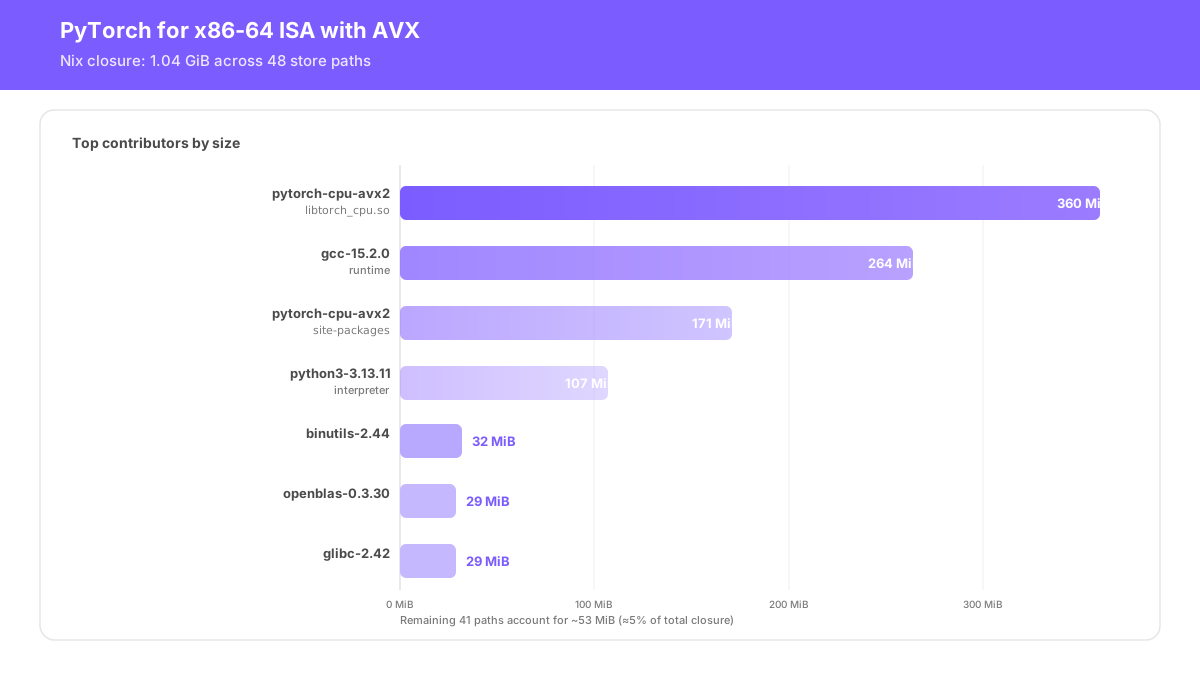
Step 3: Optimize the closure (CUDA-only)
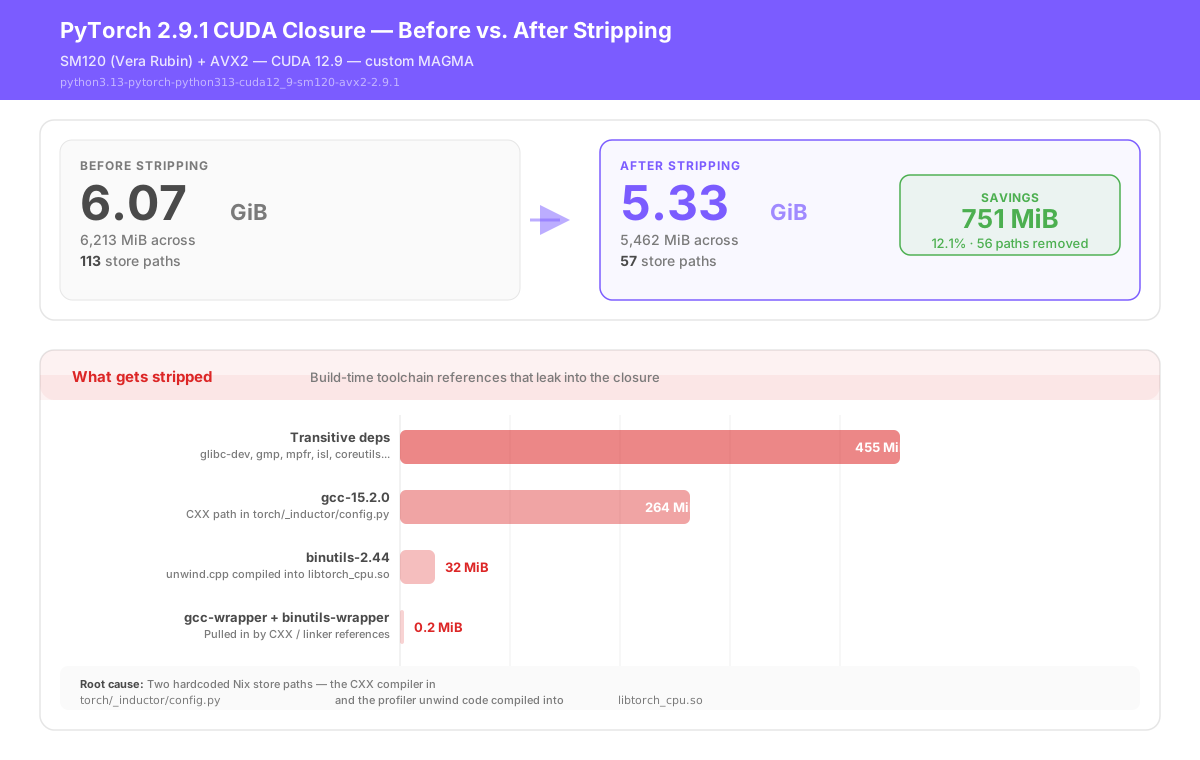
A freshly built CUDA PyTorch closure includes ~750 MiB of build tools that shouldn't ship at runtime: e.g., gcc and binutils references hardcoded in torch/_inductor/config.py and torch/csrc/profiler/unwind/unwind.cpp.
Ask the agent to strip these. It will do this by adding disallowedReferences (fails the build if gcc survives in any output) and a postFixup phase that runs remove-references-to on the offending files. This step preserves legitimate runtime libraries (like libstdc++.so and libgcc). The CUDA-accelerated closure should drop from just over 6 GiB to 5.2-5.3 GiB.
MPS builds are already compact. CPU-only builds are the smallest of all, with no GPU libraries whatsoever.
One Flox environment, three arch-specific PyTorch packages
You can publish all three variants to your private Flox Catalog; even better, you can use all three variants in the same Flox runtime environment. Flox lets you constrain packages by OS- or architecture-type, so it's fairly straightforward to simultaneously install multiple, CPU- or GPU-specific versions of PyTorch. This way, the same Flox PyTorch environment can move across the SDLC, from local dev to eval → eval to CI → CI to staging → staging to prod.
version = 1

[install]

## pytorch 2.9.1 for darwin / aarch64 mps
pytorch-darwin.pkg-path = "flox/pytorch-python313-darwin-mps"
pytorch-darwin.version = "2.9.1"
pytorch-darwin.systems = ["aarch64-darwin"]
pytorch-darwin.pkg-group = "pytorch-darwin"


## pytorch 2.9.1 for nvidia rtx 5000-series / cuda 12.9.1
pytorch-cuda.pkg-path = "pytorch-python313-cuda12_9-sm120-avx2"
pytorch-cuda.version = " 2.9.1"
pytorch-cuda.systems = "["x86_64-linux", "aarch64-linux"]
pytorch-cuda.pkg-group = "pytorch-cuda"
pytorch-cuda.priority = 0

## pytorch 2.9.1 for x86 isa / avx512
pytorch-x86.pkg-path = "pytorch-python313-cpu-avx512"
pytorch-x86.version = "2.9.1"
pytorch-x86.systems = ["x86_64-linux"]
pytorch-x86.pkg-group = "pytorch-x86"
pytorch-x86.priority = 1

## pytorch 2.9.1 for arm v9 isa
pytorch-arm.pkg-path = "pytorch-python313-cpu-avx2"
pytorch-arm.version = "2.9.1"
pytorch-arm.systems = ["aarch64-linux"]
pytorch-arm.pkg-group = "pytorch-arm"
pytorch-arm.priority = 1
Skipping the build
Building GPU- or CPU-specific PyTorch is time-consuming, even on beefy machines. If you want to start running targeted PyTorch builds, try the following prebuilt packages, each targeted PyTorch 2.9.1.
CUDA-specific packages
- PyTorch 2.9.1 for Python 3.13 and SM61:
flox install flox/pytorch-python313-cuda12_9-sm61-avx2 - PyTorch 2.9.1 for Python 3.13 and SM75:
flox install flox/pytorch-python313-cuda12_9-sm75-avx2 - PyTorch 2.9.1 for Python 3.13 and SM80:
flox install flox/pytorch-python313-cuda12_9-sm80-avx2 - PyTorch 2.9.1 for Python 3.13 and SM86:
flox install flox/pytorch-python313-cuda12_9-sm86-avx2 - PyTorch 2.9.1 for Python 3.13 and SM89:
flox install flox/pytorch-python313-cuda12_9-sm89-avx2 - PyTorch 2.9.1 for Python 3.13 and SM90:
flox install flox/pytorch-python313-cuda12_9-sm90-avx2 - PyTorch 2.9.1 for Python 3.13 and SM120:
flox install flox/pytorch-python313-cuda12_9-sm120-avx2
Darwin-specific packages
- PyTorch 2.9.1 for Apple Metal/MPS (All):
flox install flox/pytorch-python313-darwin-mps@2.9.1
CPU-specific packages
- PyTorch 2.9.1 for AVX2:
flox install flox/pytorch-python313-cpu-avx2 - PyTorch 2.9.1 for AVX512:
flox install flox/pytorch-python313-cpu-avx512
Scaling the Pattern
AI coding tools and agents speak Nix shockingly well. You can task them with creating Nix expressions for every NVIDIA SM architecture, or combinations of SM+ CUDA + Python versions, for x86 and ARM.
You can even create custom Nix expression build recipes that support long-dead hardware: e.g., defining AVX-only PyTorch builds that blacklist AVX2, AVX-512, and other more modern instructions. These will run on older Intel Xeon kit that predates AVX2. For instance, install this PyTorch package to keep an aging Xeon 1680v2 with a GTX 1080ti and 64GB of RAM in the inferencing game:
flox install flox/pytorch-python313-cuda12_9-sm61-avx@2.9.1As part of Flox's NVIDIA CUDA Kickstart Program, we've created GPU-specific build recipes for:
- PyTorch. This repo has GPU- and CPU-targeted builds for PyTorch 2.8.0 through 2.10.0, on CUDA versions 12.8 through CUDA 13.1. It uses a parametric Nix builder plus metadata tables to generate concrete, hardware-targeted PyTorch package definitions. This is a canonical pattern for generating CUDA-, PyTorch-, Python-, and hardware-specific build recipes. If you're curious about this pattern, check out the Flox CUDA Kickstart Program teased below. We can help you customize and implement custom build recipes for your own AI/ML CUDA workloads.
- ONNX Runtime. ORT 1.18 thru 1.24.2 for Python 3.12 and Python 3.13, CUDA 12.4 and CUDA 12.9. This repo segments ORT versions across Git branches.
- MAGMA. Builds MAGMA 2.9.0 for NVIDIA GPUs.
- vLLM. vLLM 0.13.0 thru v0.15.1, with vLLM 0.16.0 coming soon. This repo segments vLLM versions across separate Git branches. The hardened Flox runtime environment for vLLM model serving can be found here.
- llamacpp. GPU-specific recipes are pinned to specific historical versions of llama.cpp, plus build recipes that always build llama.cpp latest. A hardened Flox environment for llamacpp serving can be found here.
To learn more about CUDA Kickstart, check out the official GitHub repo. To get started with Flox, sign up for FloxHub and start downloading pre-built Flox environments for agentic development, enterprise-grade production inferencing, model requantization, and other use cases.