



Reproducible Flox Environments for the First and the Last Mile of AI

You can use Flox to run CUDA-accelerated ML/AI workloads "uncontained" on Kubernetes. This imageless pattern eliminates costly rebuild → push → pull → debug cycles and gives you a fast, reliable way to deploy or roll back reproducible workloads on Kubernetes.
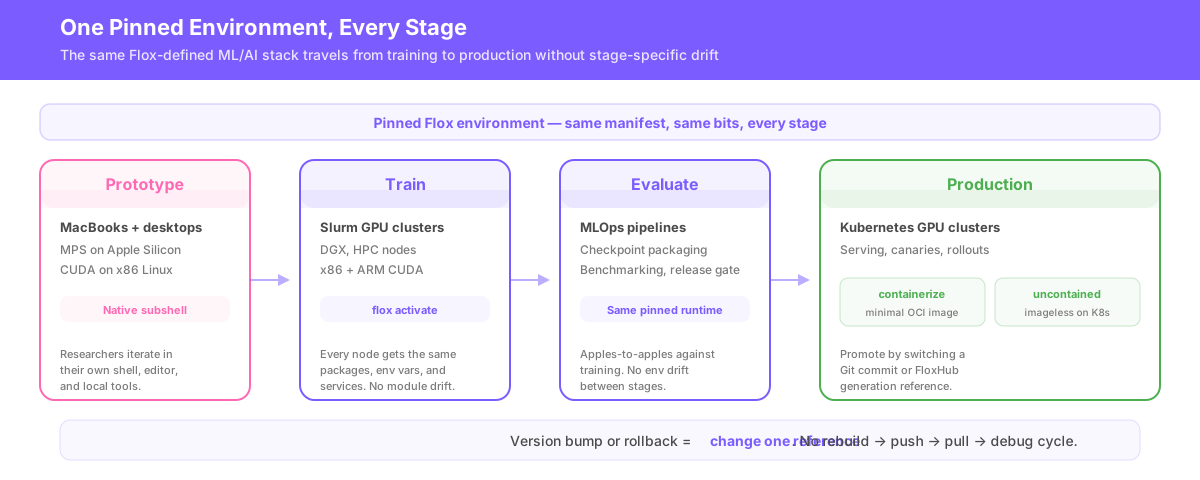
ML/AI teams can also run CUDA-accelerated Flox runtime environments on Slurm clusters during model training. Even better, the same CUDA-accelerated Flox runtime can serve as a shared, reproducible foundation across every stage of the ML lifecycle—from Slurm GPU clusters in R&D on through to Kubernetes GPU clusters in eval and production. That same composable pattern extends to the rest of the stack, letting teams layer modular environments for CUDA tooling, build dependencies, project-specific training code, evaluation workflows, and serving on top of one pinned runtime foundation:
- Teams define their GPU-accelerated ML/AI stacks: PyTorch, JaX, TensorRT, ONNX Runtime, etc.;
- ML/AI researchers define project-specific environments on top of the appropriate ML/AI runtime stack;
- The same Flox-defined ML/AI stack runs during prototyping on MacBooks, experimentation on NVIDIA DGX, and model training on Slurm. Each platform gets its own optimized GPU-accelerated dependencies;
- MLOps teams use these as the baseline when evaluating + packaging checkpoints for production; and
- Platform teams use the same runtime to power workloads across both Kubernetes and Slurm.
This way a single pinned, GPU-accelerated Flox environment definition travels from training → evaluation → production without accumulating stage-specific runtime drift. This pattern drastically reduces debugging cycles and gives teams a safe, reliable way to promote new releases or roll back to known-good ones.
A Declarative PyTorch Runtime That Works Everywhere
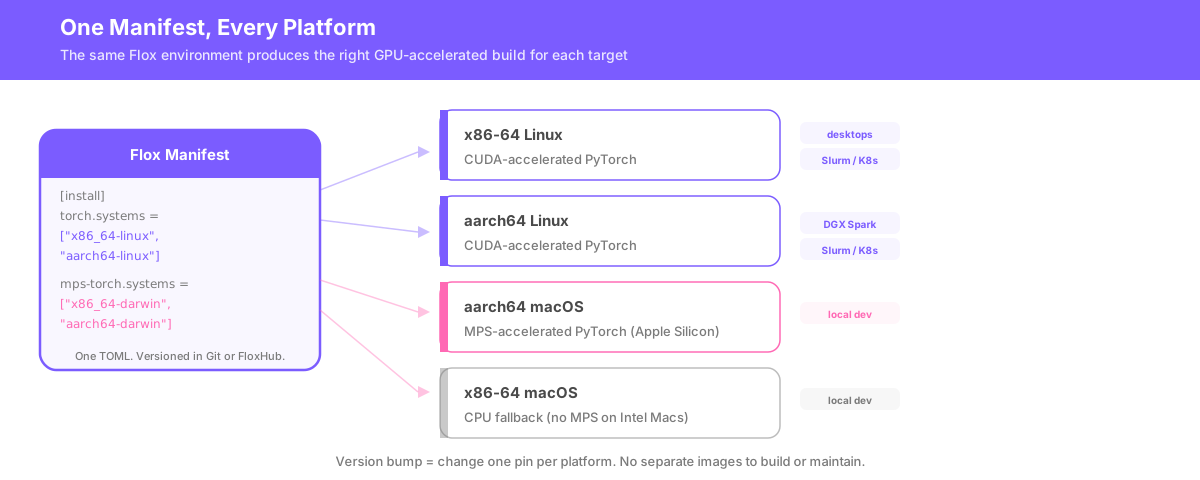
The genius of Flox is that it makes it straightforward to create declarative environment definitions that run and work the same way everywhere: not just across operating system (OS) platforms, but also across CPU (x86 and ARM) and GPU (NVIDIA CUDA and Apple Metal/MPS) architectures.
So, for example, the same Flox Pytorch environment can be used as the runtime foundation for ML/AI workloads across Mac and MacBook Pro laptops, CUDA-accelerated x86 desktops, ARM-based NVIDIA DGX Spark systems, and Slurm or Kubernetes clusters running on both x86 and ARM hardware.
A sample cross-platform, cross-architecture PyTorch environment definition looks like this:
[install]
# core python environment
python.pkg-path = "python3"
python.version = "3.13.12"
python.pkg-group = "runtime"
python.priority = 5
python.outputs = "all"

# platform- / arch-specific pytorch
torch.pkg-path = "flox-cuda/python3Packages.torch"
torch.pkg-group = "torch"
torch.version = "python3.13-torch-2.10.0"
torch.systems = ["x86_64-linux", "aarch64-linux"]

mps-torch.pkg-path = "python313Packages.torch"
mps-torch.version = "python313Packages.2.10.0"
mps-torch.systems = ["x86_64-darwin", "aarch64-darwin"]
mps-torch.priority = 6
mps-torch.pkg-group = "torch"
mps-torch.outputs = "all"
This is all you need to define a declarative, cross-platform, cross-architecture PyTorch runtime. It isn't necessary to build and maintain separate OCI images for x86 and aarch64 Linux, just as it isn't necessary to virtualize this runtime on MacOS: Linux gets CUDA-accelerated and MacOS gets MPS-accelerated PyTorch.
Best of all, changing a version—bumping to PyTorch v2.11.0 or rolling back to v2.9.1—is as simple as changing the pinned version for each platform. There's no rebuild → push → pull → test cycle whatsoever.
Just the Right CUDA Dependencies
The PyTorch environment above gives whomever or whatever runs it a GPU-accelerated PyTorch v2.10.0 runtime— whenever or wherever they run it. Teams can compose or layer this runtime with other project- or purpose-specific Flox environments to create fully declarative ML/AI stacks. Composition is analogous to container orchestration, with the key difference that it doesn't involve using either OCI images or a container runtime. Composed Flox environments run in isolated subshells on host systems.
As patterns, composition is arguably more useful than container orchestration. Container layers are reusable, but combining them means (in most cases) building, tagging, pushing, and debugging OCI images. Composition, by contrast, gives teams a declarative way to assemble modular multi-environment stacks.
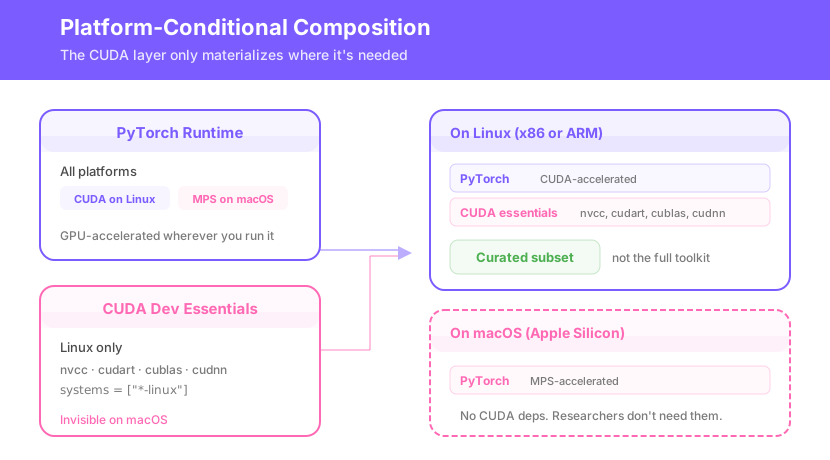
To take one example, ML/AI researchers prototyping on Mac systems have no use for NVIDIA's CUDA Toolkit or other CUDA-accelerated dependencies. But once they move beyond prototyping and need to schedule and run massively parallel jobs, they're probably going to do this work on CUDA-based hardware.
The PyTorch runtime above can be composed with the environment below to provide essential CUDA dependencies for GPU-native prototyping, experimentation, and training on CUDA-accelerated infrastructure:
[install]
cuda_nvcc.pkg-path = "flox-cuda/cudaPackages.cuda_nvcc"
cuda_nvcc.pkg-group = "cuda"
cuda_nvcc.systems = ["aarch64-linux", "x86_64-linux"]
cuda_nvcc.priority = 1

# CUDA runtime API
cuda_cudart.pkg-path = "flox-cuda/cudaPackages.cuda_cudart"
cuda_cudart.pkg-group = "cuda"
cuda_cudart.systems = ["aarch64-linux", "x86_64-linux"]
cuda_cudart.priority = 2

# CUDA toolkit (core libs only)
cudatoolkit.pkg-path = "flox-cuda/cudaPackages.cudatoolkit"
cudatoolkit.pkg-group = "cuda"
cudatoolkit.systems = ["aarch64-linux", "x86_64-linux"]
cudatoolkit.priority = 3

# CUDA Basic Linear Algebra Subroutines
libcublas.pkg-path = "flox-cuda/cudaPackages.libcublas"
libcublas.pkg-group = "cuda"
libcublas.systems = ["aarch64-linux", "x86_64-linux"]
libcublas.priority = 4

# GPU-accelerated deep neural network primitives
cudnn.pkg-path = "flox-cuda/cudaPackages.cudnn"
cudnn.pkg-group = "cudnn"
cudnn.systems = ["aarch64-linux", "x86_64-linux"]
cudnn.priority = 5

# Profiling API
cuda_cupti.pkg-path = "flox-cuda/cudaPackages.cuda_cupti"
cuda_cupti.pkg-group = "cuda"
cuda_cupti.systems = ["aarch64-linux", "x86_64-linux"]
cuda_cupti.priority = 6

# GPU debugger
cuda_gdb.pkg-path = "flox-cuda/cudaPackages.cuda_gdb"
cuda_gdb.pkg-group = "cuda"
cuda_gdb.systems = ["aarch64-linux", "x86_64-linux"]
cuda_gdb.priority = 7

# Memory/race sanitizer
cuda_sanitizer_api.pkg-path = "flox-cuda/cudaPackages.cuda_sanitizer_api"
cuda_sanitizer_api.pkg-group = "cuda"
cuda_sanitizer_api.systems = ["aarch64-linux", "x86_64-linux"]
cuda_sanitizer_api.priority = 8

# Multi-GPU/multi-node communication
nccl.pkg-path = "flox-cuda/cudaPackages.nccl"
nccl.pkg-group = "cuda"
nccl.systems = ["aarch64-linux", "x86_64-linux"]
nccl.priority = 9

# High-performance tensor primitives
cutensor.pkg-path = "flox-cuda/cudaPackages.cutensor"
cutensor.pkg-group = "cutensor"
cutensor.systems = ["aarch64-linux", "x86_64-linux"]
cutensor.priority = 10


[vars]
CUDA_ENV_VERSION = "12.9"
This environment can be used on its own as a general-purpose toolkit for CUDA development or composed along with other environments (like the PyTorch runtime) to flesh out a GPU-accelerated ML/AI development stack. Rather than pulling in the complete CUDA Toolkit (>8 GB) as a single monolithic dependency, it assembles a curated subset of core CUDA packages in classic Nix style. This way the resultant footprint is much smaller: Researchers on CUDA-enabled hardware get access to CUDA-specific dev tools; Mac users don't.
The next section looks at another modular component of this stack: a cross-platform environment for dev tooling.
A Cross-Platform Build Toolchain for R&D and MLOps
Teams in both R&D and MLOps will likely need to work with essential build tools like gcc, clang, gnumake, cmake, and similar dependencies. Precisely which tools they need depends on precisely which OS and hardware they're working with. The environment below provides OS-specific versions of essential deve tools: Linux platforms get gcc, Macs get clang.
[install]

bash.pkg-path = "bash"
coreutils.pkg-path = "coreutils"
gnumake.pkg-path = "gnumake"
cmake.pkg-path = "cmake"
pkg-config.pkg-path = "pkg-config"

# linux: gcc toolchain + system libraries
gcc.pkg-path = "gcc"
gcc.systems = ["aarch64-linux", "x86_64-linux"]

gcc-unwrapped.pkg-path = "gcc-unwrapped"		# required for libstdc++ ; it's a Nix thing
gcc-unwrapped.priority = 3
gcc-unwrapped.pkg-group = "libraries"
gcc-unwrapped.systems = ["aarch64-linux", "x86_64-linux"]

glibc.pkg-path = "glibc"
glibc.version = "2.38-44"
glibc.pkg-group = "glibc"
glibc.systems = ["aarch64-linux", "x86_64-linux"]

# macos: clang toolchain + gnu userland
clang.pkg-path = "clang"
clang.systems = ["x86_64-darwin", "aarch64-darwin"]

gnused.pkg-path = "gnused"
gnused.systems = ["x86_64-darwin", "aarch64-darwin"]

gawk.pkg-path = "gawk"
gawk.systems = ["x86_64-darwin", "aarch64-darwin"]
This environment can either be invoked on-demand (i.e., layered) or composed as part of a stack.
In this specific case, it's one of three include-d environments in the project-specific Flox environment that composes and consumes it.
Let's briefly explore that environment.
Composing a Project-Specific Model Training Environment
The environments above define the reusable foundation of a portable ML/AI stack: a cross-platform PyTorch runtime, a modular CUDA layer for NVIDIA infrastructure, and a cross-platform build environment with the toolchains commonly needed across macOS and Linux. The project-specific environment below composes those shared building blocks into a complete ML model training stack, adding the project-local dependencies, environment variables, isolation (a Python venv), and services researchers need for local development.
[install]
uv.pkg-path = "uv"


[vars]
ML_TRAINING_VENV = "$FLOX_ENV_CACHE/venv"
UV_CACHE_DIR = "$FLOX_ENV_CACHE/uv"
PIP_CACHE_DIR = "$FLOX_ENV_CACHE/pip"


[hook]
on-activate = '''
  ml_training_setup() {
    venv="$FLOX_ENV_CACHE/venv"

    if [ ! -d "$venv" ]; then
      uv venv "$venv" --python python3
    fi

    if [ -f "$venv/bin/activate" ]; then
      source "$venv/bin/activate"
    fi

    if [ ! -f "$FLOX_ENV_CACHE/.training_deps_installed" ]; then
      uv pip install --python "$venv/bin/python" --quiet \
        numpy \
        datasets \
        tokenizers \
        transformers \
        accelerate \
        safetensors \
        tensorboard \
        scikit-learn \
        tqdm \
        pyyaml
      touch "$FLOX_ENV_CACHE/.training_deps_installed"
    fi
  }
  ml_training_setup
'''

[services]

[services.tensorboard]
command = '''
  source "$FLOX_ENV_CACHE/venv/bin/activate"
  exec "$FLOX_ENV_CACHE/venv/bin/python" -m tensorboard.main \
    --logdir "${TB_LOGDIR:-$FLOX_ENV_PROJECT/runs}" \
    --host "${TB_HOST:-localhost}" \
    --port "${TB_PORT:-6006}"
'''
is-daemon = true
shutdown.command = "pkill -f 'tensorboard.main'"

[include]
environments = [
    { remote = "barstoolbluz/build-env" },
    { remote = "barstoolbluz/cuda-dev-essentials" },
    { remote = "barstoolbluz/pytorch-runtime" }
]
The TOML expressed in the [include] section transforms this from a standalone project environment into a composed ML/AI training stack. Rather than building all dependencies into a single, layered OCI image, the composing environment resolves and locks the declarative manifests defined under [include] to compatible packages at edit time. This pattern has the advantage of surfacing conflicts during resolution, not later at runtime. It also gives teams the freedom to create environments tailored to project-specific concerns—Python packages, setup/teardown logic, services, etc.—and base these on versioned runtimes and toolchains.
Running the composed environment is as simple as typing:
flox activate -r floxrox/ml-training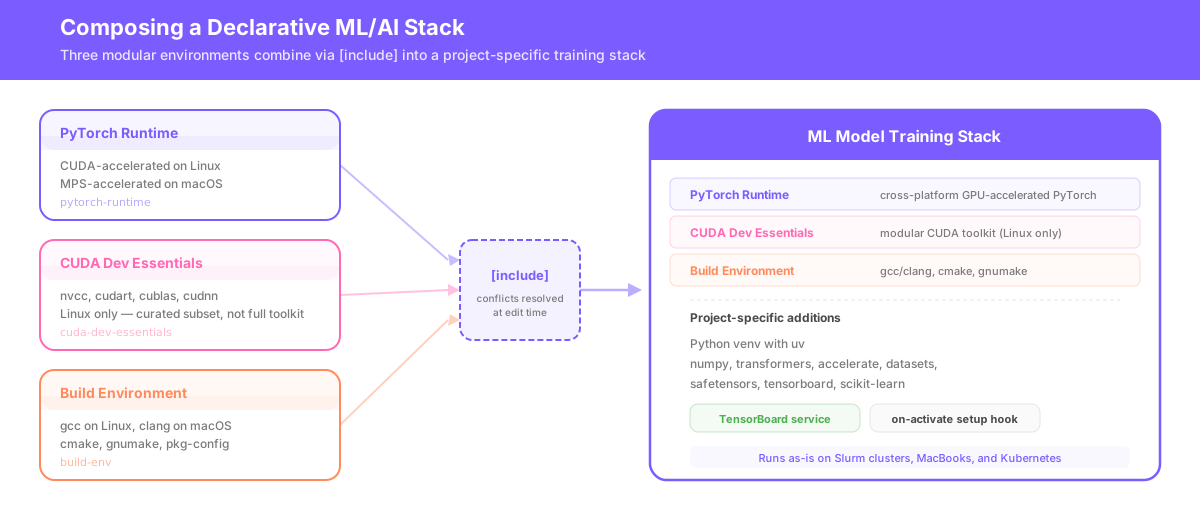
If you're on a CUDA system, make sure you've got a fast Internet connection and 10 gigabytes of disk space. The CUDA version of this stack is much bigger than the macOS one.
Flox for the First and Last Mile in AI
This composed ML stack will run as-is on Slurm clusters. You can run it from a single shared environment (accessible via NFS), or independently flox activate -r barstoolbluz/ml-training on GPU nodes. No matter how you do it, each node gets the same packages and the same runtime environment—the same env vars, services, and secrets. Just like that, Flox mitigates one of the more frustrating issues in ML/AI training today.
Because Slurm by itself doesn't address the core challenge of reproducibility: i.e., getting every node in a cluster to run against the same ML/AI runtime, with the same dependency graph and the same versions of CUDA, Python, and other critical dependencies. So researchers still have to deal with environment modules, which tend to drift across login and compute nodes. Containerized ML workflows on Slurm often depend on runtimes like Singularity or Apptainer, which require cluster-specific setup. This adds packaging and operations layers on top of the ML/AI workload itself.
Alternatives like Conda have drawbacks of their own: Conda environments that bake in a large number of CUDA and Python dependencies can take a long time to resolve. Teams cannot copy a working Conda environment to a new prefix (i.e., path) and expect it to keep working. Unless every node sees the same shared environment path, teams will typically need to add a separate packaging or distribution step.
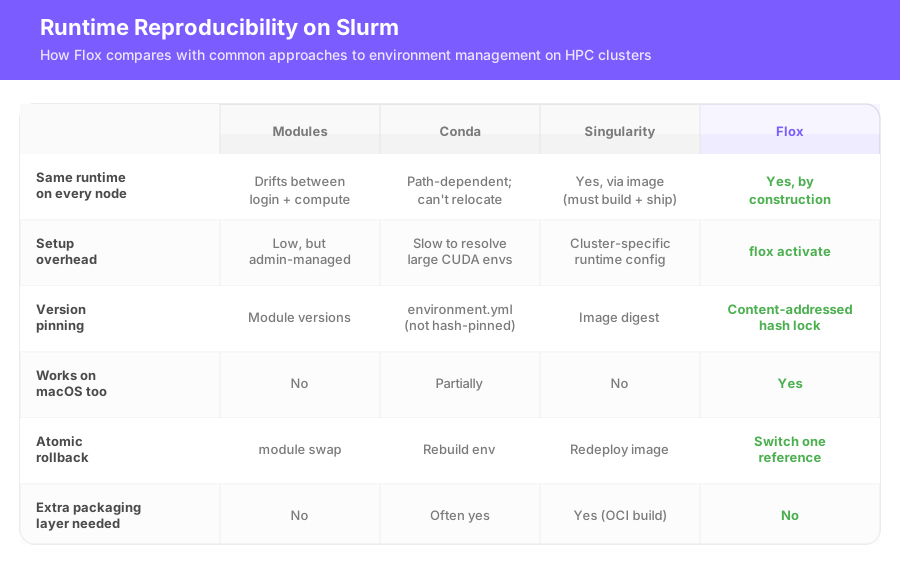
Flox matches the way shared HPC systems operate. A job script can call flox activate -d "$SLURM_SUBMIT_DIR" and run against the same pinned runtime—either defined in a project's Git repo or pulled (as a versioned, managed environment) from FloxHub at runtime. The first activation realizes the environment and populates the shared cache; later activations reuse the same pre-resolved environment.
From Training on Slurm to Serving on Kubernetes and Beyond
During model training, teams need every node in a cluster to run against the same pinned runtime. After training, MLOps and platform teams need even stronger reproducibility safeguards as they promote validated checkpoints through evaluation, staging, and production serving on Kubernetes.
Flox gives teams a fast, secure path from prototyping to batch training, and from eval to CI to prod … without forcing them to rebuild images, repackage environments, or debug inconsistencies each step of the way.
During model training, Flox makes it easy for teams to create modular ML/AI stacks composed out of pinned, versioned build and runtime dependencies. After training, MLOps teams can use this same pattern to compose purpose-built Flox environments for evaluation, benchmarking, checkpoint packaging, and release gating. Similarly, platform teams can compose their own Flox environments for staging, serving, canaries, observability, and production rollouts on Kubernetes. Again, the same declarative Flox environment serves as a runtime foundation across the ML/AI lifecycle—up to and including deployment. Platform teams can use flox containerize to generate minimal, distroless OCI images from declarative Flox environments, or run those environments "uncontained" on Kubernetes by referencing a versioned FloxHub environment directly in the Pod spec.
Flox fundamentally changes how teams train, evaluate, and maintain ML/AI stacks. The unit of promotion becomes an atomic reference (a Git commit or a specific generation of a FloxHub environment), rather than a pinned digest. Instead of rebuilding, pushing, pulling, and debugging multi-gigabyte OCI images every time a dependency changes, teams promote versioned Flox environments from training to eval to production. Visit FloxHub and get started today!