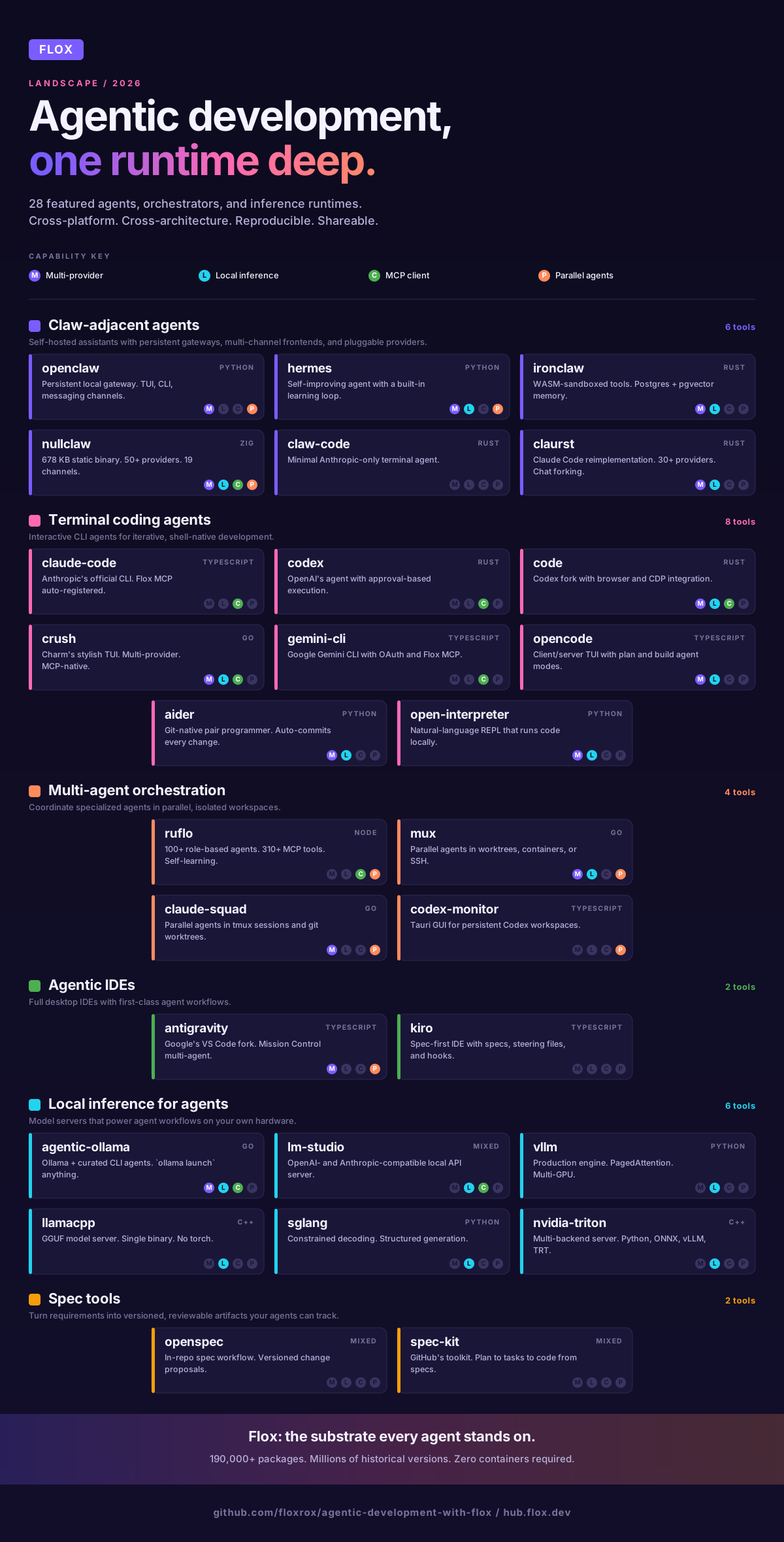




A Turnkey Toolkit for Agentic Development with Flox

Flox is a cross-language, cross-toolchain package manager that works across operating systems and CPU/GPU architectures. Claude Code, Codex, OpenCode, Gemini CLI, Copilot CLI, and other AI agents/AI coding assistants can use Flox’s MCP server to discover, find specific versions of, and install just the right dependencies, searching among millions of historical package-version combinations.
And because Flox is also a cross-platform, cross-language, cross-architecture virtual environment manager, agentic tools won’t burn tokens resolving dependency conflicts. It’s even straightforward to run conflicting versions of dependencies in the same runtime, at the same time. Need OpenSSL versions 1.1.1q and 3.0.19 in the same Flox environment, side by side? No problem!
Best of all, Flox runs directly on your system—no containers or VMs required.
And when you (or your OpenClaw minion) are ready to share what you’ve created, the Flox environments that were built and perfected locally Just Work when friends, coworkers, or random users (human and agentic) pull and run them on their own machines.
Read on to find out why Flox and FloxHub are perfect for vibe coding, prototyping, or agentic development.
AI Coding Agents & CLIs
This repo consolidates 50+ tools into a one-stop resource for agentic development. Each folder is its own turnkey Flox environment, complete with a README.md that explains what it is, how it works, and what features / affordances it offers. Clone it to get started:
git clone https://github.com/floxrox/agentic-development-with-floxOnce you download and install Flox, you can start Flox environments by running:
$ flox activateIf an environment contains services—like MCP servers, databases, model servers, workflow scheduling engines (like Airflow), and so on—you can either start them at runtime or from within an activated session.
$ flox activate -s

## or:

$ flox services start <optional_service_name>		# if more than one service is defined
This is all you need to start working with any of these tools. As for the AI agents/assistants included with this repo, many if not most will get the knowledge + context they need from the Flox MCP server; others will benefit from reading and referring back to the FLOX.md file that’s included with this repo.
Of course, these tools don’t need to know anything about Flox. Flox just lets them run anytime/anywhere. How they run and what you do with them is up to you—or (Skynet isn’t a thing yet, right?) them.
Need validated production runtimes?
The CUDA Kickstart Program gives teams a guided path to deploying hardened, validated CUDA-accelerated environments in production.
Agentic Development with Flox
The repo is a work in progress: more projects will likely be added as they’re identified. Beaucoups of thanks go out to the folks at Numtide, who inspired this with their seminal curated repo of Nix AI tools.
You can fork this repo and do whatever you want with it. You can explore each environment to crib examples for creating, customizing, or improving your own Flox environments. To copy a Flox manifest.toml declarative configuration file is to copy a version of that environment. (To copy both manifest.toml and manifest.lock is to create an exact replica of that environment.) To copy the [install], [vars], [hook], [profile], [services], or [build] sections of a Flox manifest is to copy the dependencies, variables, features, setup/teardown tasks, helper functions, or services associated with them. (Just be sure to look for deps in other parts of the manifest. For example, stuff in [services] usually depends on packages defined under [install].) The world is, as it were, yours.
Claw-adjacent agents
The “claw” cluster is a loose family of self-hosted, open-source personal/coding-agent stacks with overlapping design goals (viz.: local-first, sandboxed, multi-channel, pluggable providers) but built in different languages with wildly different tradeoffs. If you want to test-drive several of these stacks side by side, Flox offers arguably the path of least resistance: You could even activate each environment and run them at the same time; you don’t need to worry about them stomping on one another’s runtimes or config.
Self-hosted AI assistant and agent platform. OpenClaw runs a persistent local gateway that multiple frontends can connect to: a built-in TUI, single-turn CLI agent mode, or external chat channels (Telegram, Discord, WhatsApp). Uses OpenRouter as its model provider, facilitating access to a large catalog of models (Claude, GPT, Gemini, Llama, etc.) via a single API key. Features agent workspaces with session persistence, cron scheduling, plugin/skill systems, a browser automation subsystem, and sandbox containers for agent isolation. Includes a doctor command for health checks and self-repair. This Flox environment runs the gateway as a managed service (flox activate -s) that stops automatically when you exit. This means no orphaned daemons or persistent systemd units.
Self-improving AI agent from Nous Research with a built-in learning loop. Hermes turns repeated work into reusable skills, improves them during use, nudges itself to save useful knowledge, and searches past conversations for recall across sessions. Runs as a persistent gateway you can talk to from a full TUI or from messaging platforms like Telegram, Discord, Slack, WhatsApp, Signal, and email.
Model choice is wide open: Nous Portal, OpenRouter, NVIDIA NIM, Hugging Face, OpenAI, and other compatible endpoints, all switchable with hermes model. Hermes also supports scheduled automations, isolated subagents for parallel work, and multiple execution backends, so it can live on anything from a cheap VPS to a cloud GPU cluster. Hermes feels like a close relative of OpenClaw, but with a focus on learning from past work, building reusable behaviors, and running as a persistent agent.
Secure personal AI assistant written in Rust by NEAR AI. Built around WASM-sandboxed tool execution with capability-based permissions, credential-leak detection, and HTTP allowlisting. Persistent memory runs on PostgreSQL + pgvector if you flox activate -s, enabling hybrid full-text and vector search (Reciprocal Rank Fusion); runs on an embedded libSQL database if you run without services (e.g., flox activate). Multi-provider (NEAR AI, Anthropic, OpenAI, Gemini, Copilot, Ollama, Mistral, OpenRouter, and more) and multi-channel (REPL, HTTP webhooks, Web Gateway, Telegram, Slack) via WASM channels. A routines engine handles cron schedules, event triggers, webhook handlers, and heartbeat loops; a dynamic-tools feature can build new WASM tools from natural-language descriptions. Note: This Flox environment auto-detects Postgres-mode vs libSQL-mode based on whether you run flox activate -s.
The minimalist end of the claw family. NullClaw is an ultra-minimal autonomous assistant written in Zig that ships as a single static binary (~678 KB) with zero runtime dependencies, boots in under 2 ms, uses ~1 MB peak RAM, and runs anywhere from $5 ARM boards to cloud servers. Despite the footprint, it supports 50+ AI providers, 19 messaging channels (CLI, Telegram, Signal, Discord, Slack, iMessage, Matrix, WhatsApp, IRC, Email, and more), 10 memory engines (SQLite with hybrid FTS5 + vector by default, plus Postgres, Redis, ClickHouse, LanceDB, Markdown, etc.), and 35+ built-in tools (shell, file I/O, browser, web search, MCP, subagents, voice). Optional HTTP gateway uses a 6-digit pairing code for API access.
Lightweight Rust terminal coding agent that talks to Anthropic’s API. Fast single binary, no runtime dependencies, tool execution (shell, file ops, code editing), and session persistence. Think of it as a pared-down alternative to the official Claude Code CLI: no multi-provider routing, no MCP, just a tight loop for interactive development with Claude. Set ANTHROPIC_API_KEY and run claw; use claw doctor for health checks.
Clean-room Rust reimplementation of Claude Code’s CLI. Where claw-code is Anthropic-only and minimal, claurst goes multi-provider (Anthropic, OpenAI, Google, GitHub Copilot, Ollama, DeepSeek, Groq, Mistral, and 30+ more via an in-app /connect wizard) and adds features the upstream doesn’t have: a rich TUI with chat forking / conversation branching, two-tier memory consolidation (short-term session history + long-term markdown files), sub-100 ms startup, ~50 MB peak memory, and zero telemetry. If you want the Claude Code workflow but without the vendor lock-in—or the phone-home—this is the one.
Terminal coding agents
Anthropic's official Claude Code CLI bundled with Flox MCP server. Automatically registers the Flox MCP server with Claude Code on activation, enabling Claude to manage Flox environments and packages directly. Creates a turnkey Claude Code development environment with built-in Flox integration. Defines optional GitHub and GitLab MCP servers, too; run flox edit and uncomment these to use.
Note: This environment should pick up new versions of Claude Code as they become available; just run flox upgrade within the repo directory to force an upgrade.
OpenAI's local AI coding agent with ChatGPT account integration and approval-based command execution. (Supports a YOLO mode to bypass approval requirements: codex --sandbox danger-full-access). This environment includes a pre-integrated Flox MCP server.
Officially known as “Every Code,” nicknamed “Code” by its maintainers. (The better to defy grep, find, and Internet search indexers?) Fork of OpenAI’s Codex (see above) that expects to track/stay compatible with that project. Extends Codex with browser/Chrome DevTools Protocol (CDP) integration, plus support for third-party agents and MCP servers. Recent versions add a verification-first loop: automatically re-reviewing code changes in parallel (in a separate worktree) and streaming runtime signals from the app/browser back into the agent. Defaults to local Ollama in this Flox environment—no API costs, no keys, just flox activate -s to start the Ollama service and ollama pull a coding model. To run against the OpenAI API instead, set OPENAI_BASE_URL=https://api.openai.com/v1 and OPENAI_API_KEY before activating. Each project gets its own isolated code config under $FLOX_ENV_CACHE.
Charm's glamorous, stylish, and surprisingly powerful AI coding agent front-end. (Full disclosure: We here at Flox are fans.) Ships with a self-bootstrapping wizard that encrypts/stores secrets using system keyring (if available). Supports multiple providers—including Ollama! Pre-integrated with the Flox MCP server. Arguably the most versatile agentic coding assistant out there.
Google's Gemini AI agent for terminal with authentication (OAuth, API key, or Vertex AI) and MCP server integration with Flox. Features JSON output for scripting automation and includes VS Code extension for editor integration. Includes Google Cloud integration and JSON output format for scripting.
Open-source AI coding agent built for the terminal. Its TUI lets you switch between “build” (for interactive development) and “plan” (for analysis + code exploration) agents. In “plan” mode, OpenCode defaults to read-only behavior, asks before running shell commands, and is geared toward planning changes. You can point OpenCode at Anthropic’s Claude, OpenAI’s GPT models, or Google Gemini, along with local providers (like Ollama). Uses a client/server architecture so the TUI is just one possible client. (You can run the agent on one machine and drive it from another client). OpenCode offers an optional (beta) desktop app, plus an internal “@general” subagent that can perform complex searches + multi-step tasks.
Aider is a terminal pair programmer whose distinguishing move is tight git integration: every change lands as an automatic commit with a descriptive message, so undoing a bad suggestion is just git reset. Supports 100+ languages and multiple providers (Anthropic, OpenAI, DeepSeek, Gemini, Ollama, OpenRouter). This Flox environment installs aider-chat-full, which includes the voice and browser-UI extras: pass --browser for a Streamlit web interface, or just run aider for the default terminal chat. Point it at a local model (aider --model ollama_chat/gemma4) and you get a pair programmer that never leaves your machine.
Natural-language interface for running code locally—an unrestricted alternative to ChatGPT’s Code Interpreter. Drops you into a REPL (interpreter or i) where the model can execute Python, JavaScript, or shell commands on your machine with no file-size or runtime limits. Multi-provider via LiteLLM: OpenAI, Anthropic, Cohere, Ollama, LM Studio, Llamafile, or any OpenAI-compatible endpoint. Use --local for fully offline operation with Llamafile; -y to skip per-command confirmation; YAML profiles for per-project settings. Where coding agents like Claude Code or Codex focus on editing source files, Open Interpreter focuses on running things—data exploration, scripting, ad-hoc automation.
Multi-agent orchestration & parallel workflows
The next cluster is all about running multiple agents at once—either coordinating specialized sub-agents inside a single task, or fanning out several independent agents across isolated workspaces so you can review their work as it lands.
Multi-agent orchestration platform that sits on top of Claude Code. (Formerly known as Claude Flow.) Ruflo coordinates 100+ specialized role-based agents—coder, tester, reviewer, architect, security, etc.—across mesh, hierarchical, ring, or star topologies with Raft, BFT, or Gossip consensus. Adds a self-learning layer (RuVector / SONA) with reinforcement learning, Flash Attention, HNSW vector search, and pattern storage; a Q-Learning router with 8 experts and 130+ skills dispatches tasks by complexity. Exposes 310+ MCP tools to Claude Code natively. Ruflo installs via npm on first activation of this Flox environment.
Parallel agentic development from Coder. Mux lets you plan and execute tasks with multiple agents simultaneously, each in its own isolated workspace: git worktree, Docker container, SSH remote, or local directory. Multi-provider (Anthropic, OpenAI, Google, xAI, DeepSeek, OpenRouter, Ollama, AWS Bedrock, GitHub Copilot) with a plan/exec loop and built-in orchestrator sub-agents (exec, explore, plan). Use the one-shot CLI (mux run "Refactor the auth module"), the browser UI (start the Flox service and hit localhost:3000), or the desktop app. Good for the "fan out N tasks, review diffs as they land" workflow.
TUI for managing multiple terminal agents in parallel—complementary to Mux but leaner and model-agnostic. Each agent runs in its own tmux session and git worktree so tasks can’t conflict. Ships with profiles for Claude Code (default), OpenAI Codex, Gemini CLI, Aider, or any custom command you define in ~/.claude-squad/config.json. Background execution with optional -y auto-accept, in-TUI diff review, commit/push/PR—so you can watch five agents churn through tickets from one terminal and approve their work as it’s ready.
Tauri desktop app that orchestrates multiple OpenAI Codex agents across persistent workspaces. Each workspace spawns its own codex app-server process; threads are pinnable, renameable, archivable, and resumable. Tight Git/GitHub integration (diffs, staging, commits, branches, PRs, issues via the gh CLI); a composer with image attachments, skill autocomplete ($), prompt libraries (/prompts:), and @-mention file paths. Whisper-based dictation, a file tree with search, global + per-workspace prompt libraries, a terminal dock with tabs, and an optional remote-daemon mode over Tailscale. Where Claude Squad is terminal and model-agnostic, Codex Monitor is GUI and Codex-specific.
Agentic IDEs
Both of these are full desktop IDEs rather than TUIs, and both orchestrate multiple agents—but their philosophies are very different. Antigravity is Google’s agent-first VS Code fork built around a Mission Control dashboard; Kiro is a spec-first IDE that formalizes planning, constraints, and automation via first-class workflow primitives.
Google’s agent-first IDE: a deep fork of VS Code that integrates Gemini (and Claude) for autonomous multi-agent coding. Three surfaces: a familiar Editor with inline AI commands (Cmd/Ctrl+I) and tab completions; a Manager (“Mission Control”) view for spawning and monitoring parallel autonomous agents across workspaces; and an integrated Browser for agent-driven web testing. Multi-model: Gemini 3.1 Pro, Gemini 3 Flash, Claude Sonnet 4.6, and Claude Opus 4.6. Agents produce artifacts—code diffs, screenshots, browser recordings, implementation plans—that you review asynchronously. Per-project agents.md and skills.md files provide persistent instructions and reusable skills (à la CLAUDE.md). Gemini is free on activation; sign in with a Google account.
Kiro is a spec-first desktop IDE (also VS Code-based) that embeds a coding agent. Instead of a chat-driven UX, Kiro incorporates first-class workflow primitives—specs, steering files, and hooks—to formalize how work gets planned, constrained, and automated. It turns prompts into specs, extracting requirements and producing an implementation plan; markdown steering files apply persistent guidance across tasks; hooks fire on file events to automate quality gates. Kiro codebase-indexes your workspace by scanning + tracking code, configs, docs, and dependencies. The IDE runs locally, but AWS operates the backend and powers inference via Amazon Bedrock.
Local inference for agents
Ollama paired with a curated set of CLI coding agents, pre-wired for ollama launch. Pull a tool-use-capable model (ollama pull gemma4, qwen3, devstral, llama4, …), start the service with flox activate -s, and launch any bundled agent against it in one command: ollama launch claude --model gemma4, ollama launch codex --model gemma4, ollama launch opencode --model gemma4, ollama launch openclaw --model gemma4. Includes the Flox MCP server. GPU accelerated on supported platforms (Nvidia CUDA, Apple Metal/MPS), with CPU fallback; edit the manifest to swap ollama-cuda for ollama-rocm on AMD. The one-command path from “downloaded a model” to “running a coding agent against it locally.”
Headless-by-default local inference server with a desktop GUI when you want one. Runs llama.cpp everywhere and MLX on Apple Silicon. Exposes both an OpenAI-compatible API (/v1/chat/completions) and an Anthropic-compatible API (/v1/messages) on localhost:1234—drop-in for either SDK. Supports tool calling, JSON-schema structured output, MCP servers, and configurable parallel inference slots (default 4). The headless daemon starts automatically via flox activate -s; opt into the GUI with LMS_GUI=true. Designed to be composed into other Flox environments: when you want a local backend that speaks Anthropic’s protocol, not just OpenAI’s, this is the one.
The next four are production-grade inference engines. They’re almost certainly overkill for a single developer vibe-coding against a local model—Ollama or LM Studio will serve you better day-to-day—but they’re cool to have on hand when you need serious throughput, multi-GPU deployments, or want to experiment with the runtimes that actually power production LLM serving. All four are x86_64-linux only and require an NVIDIA GPU with a recent CUDA driver.
Production inference and serving engine, optimized for high throughput and low latency via PagedAttention KV-cache management and continuous batching. This Flox environment installs flox-cuda/python3Packages.vllm from the catalog along with flox/vllm-flox-runtime (model provisioning + serving scripts). Exposes an OpenAI-compatible API on localhost:8000. Override the model at activation with VLLM_MODEL and VLLM_MODEL_ORG env vars. Supports streaming, prefix caching, Multi-LoRA, distributed inference (tensor/pipeline/data/expert parallelism), and INT4/INT8/FP8 quantization. Handles MoE, embeddings, and multimodal models from Hugging Face.
llama-server wrapped as a production Flox environment. Where vLLM serves full HuggingFace model directories, llama.cpp serves GGUF files—single files or split shard sets—so quantized models run out of the box with no torch dependency and the entire runtime is a single compiled binary. Uses flox-cuda/llama-cpp (CUDA 12.9, driver 575+). Defaults to bartowski/Meta-Llama-3.1-8B-Instruct-GGUF (Q4_K_M, ~4.9 GB) on localhost:8080 with GPU offload and continuous batching. Override the model at activation with LLAMACPP_MODEL, LLAMACPP_MODEL_ORG, LLAMACPP_MODEL_ID, and LLAMACPP_QUANT. OpenAI-compatible API.
High-performance serving framework focused on structured generation, constrained decoding, and complex multi-call LLM programs. CUDA 12.8 (driver 550+), AVX2 required. The default manifest targets an all-SM build covering T4, A10, A100, L40, H100, B200, and RTX 3090/4090/5090 (SM75–SM120); swap in a GPU-family-specific package (e.g., flox/sglang-python312-cuda12_8-sm89-avx2 for Ada Lovelace) if you want a tighter build. Defaults to Phi-4-mini-instruct-FP8-TORCHAO on localhost:30000; override with SGLANG_MODEL at activation. Supports tensor parallelism across multiple GPUs (SGLANG_TP_SIZE=4) for 70B-class models and attention-backend tuning for older GPUs (SGLANG_ATTENTION_BACKEND=triton).
NVIDIA’s Triton Inference Server, built from source via Nix and shipped with four backends: Python, ONNX Runtime, vLLM, and TensorRT. Triton serves model repositories—directories containing versioned subdirectories with backend-specific artifacts and optional config.pbtxt files—and exposes HTTP, gRPC, and Prometheus metrics simultaneously on separate ports. This runtime handles the operational lifecycle: port reclaim, model provisioning, environment validation, and process management. Defaults to Phi-3.5-mini-instruct-AWQ via the vLLM backend with zero network access (the model is installed as a Flox package, ~2.2 GB). Opt into an OpenAI-compatible frontend on port 9000 with TRITON_OPENAI_FRONTEND=true. This is the one you reach for when you need to serve many models concurrently across mixed backends with production-grade observability.
Spec tools
OpenSpec and GitHub’s spec-kit both push the same idea: make AI-assisted coding more predictable by turning requirements into versioned, reviewable artifacts you can diff, test against, and hold the implementation accountable to. Align on intent before any code is generated; keep an auditable trail from spec → tasks → changes.
A spec workflow you add to your existing repos so you + your AI coding assistant can align on intended behavior. Run openspec init to create an openspec/ sub-folder structure: openspec/specs/ stores the current source-of-truth specs; openspec/changes/ the per-feature change folders that bundle a proposal. This path also stores a task checklist and spec deltas (i.e., the “patch” to the specs). Some assistants surface OpenSpec’s steps as /openspec <verb> slash commands after running openspec init, because OpenSpec writes the instruction/config files they read at startup. But these commands are mere shortcuts: the “real” workflow lives in the repo as an openspec/ folder. With tools that don’t support custom slash commands, you run the same spec-first loop by posing requests in plain language and having the assistant create/review/apply/archive OpenSpec files.
spec-kit (GitHub Spec Kit)
GitHub’s open-source toolkit for “spec-driven development.” Pushes you to define requirements + outcomes first, then turns your spec into: plan → task list → code. Run the specify CLI (specify init, specify check) to scaffold or retrofit projects. Spec Kit drops a small set of files into your repo and configures your preferred agent so that when you type /speckit.<command>, the agent runs Spec Kit’s scripts and uses the generated artifacts. Supports a broad range of tools out of the box: Claude Code, OpenAI Codex CLI, Gemini CLI, Cursor, Copilot, Kilo Code, OpenCode, and Qwen Code.
>190,000 Other Packages, Millions of Historical Versions
The Flox Catalog contains just about every dependency you (or your AI agent minions) will need to build, test, and ship software. The Flox environments collected in this repo offer ready-to-run implementations showcasing some of these packages; however, what you see here isn’t close to exhausting the possibilities of what’s available. Here’s a sampling of the MCP packages available in the Flox Catalog:
- github-mcp-server. Exposes GitHub repo/issue/PR operations via the GitHub API.
- gitea-mcp-server. Exposes Gitea repo/issue/PR operations via the Gitea API.
- terraform-mcp-server. Lets agent inspect/plan/apply Terraform workflows.
- mcp-k8s-go. Go-based MCP tool server that exposes Kubernetes cluster operations (via
kubectl-style reads/actions) as callable tools. - aks-mcp-server. MCP server for Microsoft’s Azure Kubernetes Service (AKS); supports cluster/resource management + other operations; surfaced as MCP tools.
- playwright-mcp. Exposes Playwright browser automations (navigate/click/extract/screenshot) as MCP tools.
- mcp-grafana. Exposes Grafana entities (dashboards/panels/alerts/queries) as tools.
- mcp-proxy. Forwards/bridges MCP connections so clients can reach tool servers through a single hop.
- pythonXXXPackages.mcp (where
XXXis the version). Python MCP library/SDK used to build MCP clients/servers and define tool schemas in Python. Packages available for Python versions 3.10-3.13. - toolhive. Installs/runs/manages MCP servers as “tool bundles” so agents can consume them.
But Wait: There's More
How about another serving of turn-key environments to build with as you ramp up your vibecoding vacation? If you or your AI agent minion need a database, scheduler, workflow management engine, httpd/reverse proxy, or other tools, services, or runtimes, check out the following repos:
- flox/floxenvs. A collection of ready-to-run Flox environment examples (via flake.nix) for language toolchains like Go, Python (pip/poetry/uv), JavaScript (node/bun/deno), Ruby, and Rust, plus local service stacks like Postgres, Redis, MySQL, MongoDB, Cassandra, and Elasticsearch. This repo also includes environment templates for tools/apps such as nginx, mkcert, direnv/dotenv, 1Password, Dagger, Podman/Colima, LocalStack, JupyterLab, and Ollama.
- floxrox/floxenvs. Another collection of ready-to-run Flox environments, including: Airflow, AWS CLI, Colima, ComfyUI, Dagster, GitHub CLI, Jenkins, JupyterLab, Kafka (plus Karapace, a schema registry), kind, MariaDB/MySQL, n8n, Neo4j, nginx, Node-RED, Ollama (plus Open WebUI), Postgres (including a Metabase combo), Prefect, Redis, Spark, Temporal (plus a temporal-ui env), and multiple Python dev environments (3.10–3.13).
You and your AI assistants can combine these environments in two complementary ways:
- Composition. Compose multiple modular environments into a single, declarative “stack” that resolves and locks everything up front. Composition is great when you need reproducible, shareable setups;
- Layering. Layer environments one on top of another at runtime. Useful for adding tools/services when you need them in the moment: e.g., layering Python debugging tools on top of core Python dev tools.
In practice you’ll often use both: using composition to create rich “stack” environments; layering extras on top when you need them.
What else? How about Flox-and-AI guides to get you started?
- Reproducible Dev Environments in Any Repo with AI Agents and Flox: Part 1
- Reproducible Dev Environments in Any Repo with AI Agents and Flox: Part 2
- Next-Level Agentic Coding with Nix and Flox
- Reproducible Builds Made Simple with Nix and Flox
- Composable Dev Environments: Layering and Composition in Flox
- Production Model Serving Using NVIDIA Triton, vLLM, and llama.cpp with Flox
Ready to try? Sign in to FloxHub!