




Run Cutting-Edge Frontier Models like Gemma 4 and GLM 4.7 Flash Locally with Flox

tl;dr It’s easy to get started with the latest frontier coding models on your MacBook, Linux, or Windows (with WSL2) laptop: Just run Flox’s Agentic Ollama or Agentic LM Studio environments. Both give you turn-key model serving stacks on your local system. Both offer out-of-the-box support for Claude Code, Codex, OpenCode, and OpenClaw. Coding locally with Gemma 4, GLM 4.7 Flash, and other cutting-edge frontier models is as simple as installing Flox and running:
flox activate -s -r flox/agentic-ollama -- ollama launch claude --model Gemma 4:31b
Or:
flox activate -s -r flox/agentic-lmstudio -- lms-launch codex --model zai-org/glm-4.7-flash
Read on to discover how fast and simple it is to get a turn-key model-serving stack up and running on your laptop.
Your MacBook Pro Is a Model-Serving Champ—Use It Like One
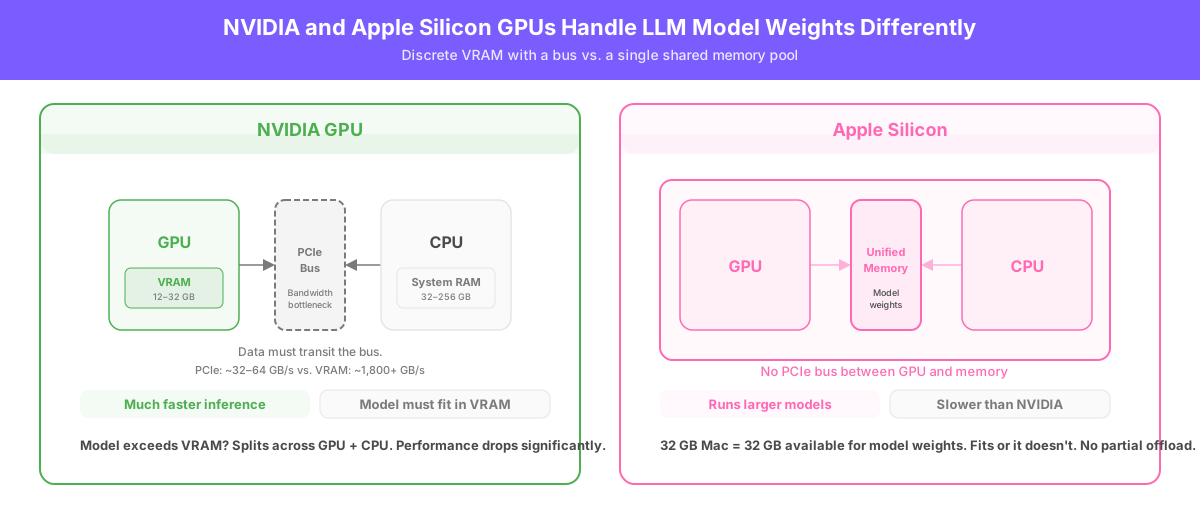
Mac users know that their MacBook Pros have a secret weapon: Apple’s unified memory architecture. On a MacBook Pro, LLM model weights sit in shared memory, so the GPU accesses them via Apple’s GPU-accelerated Metal/MPS API without needing a separate VRAM pool. This means a 32 GB MacBook Pro can run models that require a GPU with 32GB of VRAM—like NVIDIA’s $2,000 RTX 5090.
This does not mean Metal-accelerated Macs outperform NVIDIA’s top-tier consumer GPU, or NVIDIA GPUs with less VRAM, for that matter. NVIDIA’s recent RTX GPUs are still much faster than Macs for local inference when models fit into VRAM.
Apple Silicon’s advantage is that compared to NVIDIA’s RTX 5080 and RTX 5070, Macs can run models that exceed the VRAM of NVIDIA GPUs without splitting memory between the GPU and CPU RAM. One drawback is that this also practically limits the size (in GB) of the models you can run locally on Macs. A model either fits entirely into available unified memory or it doesn't.
Because Flox environments don't use containers, Ollama and LM Studio run directly on the host with unfettered access to hardware. This matters on macOS, where containers run inside a Linux VM and Metal/MPS acceleration isn’t available. This also replaces the manual install path: Flox manages the service lifecycle, so Ollama and LM Studio run on demand without persistent systemd or launchd units; if desired, you can configure them as long-running services. Updating Ollama, LM Studio, and their dependencies is as simple as running flox upgrade.
This article shows cutting-edge models running on both NVIDIA CUDA and Apple Silicon GPUs using the same Flox environment, no containers or VMs required.
Turn-Key Ollama with Gemma 4
After you download and install Flox, run the following command to get a Flox environment pre-configured to run Anthropic’s Claude Code, OpenAI’s Codex, and OpenCode against the popular Ollama model-serving framework.
flox activate -s -r flox/agentic-ollamaThis runs a remote FloxHub environment on your local system. It’s a way dynamically to invoke pre-built environments without cloning them to a specific local path, as you would with git clone or (its Flox equivalent) flox pull. The -s switch starts the Flox-managed Ollama service; the -r switch tells Flox that it needs to run agentic-ollama from FloxHub.
Once Ollama is running, install the big Gemma 4 model (20GB) on your MacBook:
ollama launch claude --model Gemma 4:31bOllama will prompt you as to whether or not you want to download the 20GB Gemma model. (You do.)
Download Gemma 4:31b?

   Yes    No

←/→ navigate • enter confirm • esc cancel
Once your download completes, it should put you right into Claude Code:
pulling manifest
pulling 280af6832eca: 100% ▕██████████████████████████▏  19 GB
pulling 7339fa418c9a: 100% ▕██████████████████████████▏  11 KB
pulling 56380ca2ab89: 100% ▕██████████████████████████▏   42 B
pulling 0940386273ff: 100% ▕██████████████████████████▏  474 B
verifying sha256 digest
writing manifest
success
╭─── Claude Code v2.1.112 ─────────────────────────────────────────╮
│                                                                  │
│                      Welcome back daedalus!                      │
│                                                                  │
│                             ▐▛███▜▌                              │
│                            ▝▜█████▛▘                             │
│                              ▘▘ ▝▝                               │
│                                                                  │
│  Gemma 4:31b with high effort                                    │
│  API Usage Billing                                               │
│  steve@foo.com's Organization                                    │
│  ~/dev/agentic-development-with-flox/agentic-ollama              │
│                                                                  │
├──────────────────────────────────────────────────────────────────┤
│                                                                  │
│  Tips for getting started                                        │
│  Run /init to create a CLAUDE.md file with                       │
│  instructions for Claude                                         │
│                                                                  │
│  Recent activity                                                 │
│  No recent activity                                              │
│                                                                  │
╰──────────────────────────────────────────────────────────────────╯

  ↑ Opus now defaults to 1M context · 5x more room, same pricing

────────────────────────────────────────────────────────────────────
❯
────────────────────────────────────────────────────────────────────
  ? for shortcuts
Turn-Key LM Studio with Gemma 4
For smaller MacBooks (like those with 16GB of RAM), Google’s Gemma 4:e4b is an adequate-performing alternative. We’ll showcase another model serving framework, LM Studio, with this model. Unlike Ollama, LM Studio has a GUI, although this walk-through uses its lms CLI interface. If you prefer to work with a GUI, however, you simply need run lm-studio in your terminal to bring up the Electron-based app.
This time we’ll run Gemma 4 via OpenAI’s Codex CLI. First we’ll load the smaller Gemma 4 model:
lms-launch codex --model google/gemma-4-e4bThis uses a Flox-defined helper function (lms-launch) to load Gemma 4:e4b (9.6 GB). If Gemma 4:e4b isn’t already available locally, the helper function uses the lms command-line tool to download it automatically. Lastly, it runs Codex against Gemma 4:e4b once it’s loaded.
Note: If you haven't already used it, Codex prompts you to configure auth; simply select option 3. Provide your own API key, and accept the default key (lm-studio). This tells Codex to use Gemma 4:e4b instead of one of OpenAI’s models:
  Welcome to Codex, OpenAI's command-line coding agent

  Sign in with ChatGPT to use Codex as part of your paid plan
  or connect an API key for usage-based billing

  1. Sign in with ChatGPT
     Usage included with Plus, Pro, Business, and Enterprise plans

  2. Sign in with Device Code
     Sign in from another device with a one-time code

> 3. Provide your own API key
     Pay for what you use
On smaller Macs, like one of the Mac mini systems Flox uses as a Nix builder, the 9.6-GB Gemma 4 model isn’t blazingly fast. But it’s workable. If you have a smaller MacBook Pro (or a fleet of Mac Minis) and want to code or experiment with agentic workflows, it’s genuinely useful. You can definitely GSD:
flox [agentic-lmstudio] daedalus@Theodores-Mac-mini:~/dev/agentic-development-with-flox/agentic-lmstudio % lms-launch codex --model google/gemma-4-e4b
Launching Codex against LM Studio at http://127.0.0.1:1234 ...
╭───────────────────────────────────────────────────────────────╮
│ ✨ Update available! 0.118.0 -> 0.121.0                       │
│ See https://github.com/openai/codex for installation options. │
│                                                               │
│ See full release notes:                                       │
│ https://github.com/openai/codex/releases/latest               │
╰───────────────────────────────────────────────────────────────╯

╭──────────────────────────────────────────────────╮
│ >_ OpenAI Codex (v0.118.0)                       │
│                                                  │
│ model:     google/gemma-4-e4b   /model to change │
│ directory: ~/dev/…/agentic-lmstudio              │
╰──────────────────────────────────────────────────╯
Speaking of agentic workflows, both the agentic-ollama and agentic-lmstudio environments include OpenClaw. It’s hidden by default; you can enable it by running flox edit and uncommenting it in the Flox manifest:
# agentic cli tools
claude-code.pkg-path = "claude-code"
claude-code.pkg-group = "agentic"
claude-code.outputs = "all"
codex.pkg-path = "codex"
codex.pkg-group = "agentic"
codex.outputs = "all"
opencode.pkg-path = "opencode"
opencode.pkg-group = "agentic"
opencode.outputs = "all"
#openclaw.pkg-path = "flox/openclaw"    # uncomment to use openclaw
#openclaw.pkg-group = "agentic"
Coding Locally with GLM 4.7 Flash
The finale showcases GLM 4.7 Flash from Z.ai, one of the most exciting frontier coding models out there.
You can fire up the agentic-ollama environment with GLM 4.7 Flash just by running:
flox activate -s -r flox/agentic-ollama -- ollama launch opencode --model glm-4.7-flash:q8_0This activates the FloxHub agentic-ollama environment, starts the Ollama service, and runs OpenCode with the 32GB version (!) of GLM 4.7 Flash. If you don’t already have this model, Ollama will download it. Note: The model might not fit into memory on a 32GB MacBook Pro; check out the LM Studio example below to run a smaller GLM Flash 4.7 model that will fit into the MacBook’s VRAM.
The code below shows GLM 4.7 Flash fitting into the RTX 5090’s 32GB of VRAM:
| 0  NVIDIA GeForce RTX 5090 On | 00000000:01:00.0 Off |         N/A |
| 0%  46C  P1   263W / 575W     | 32017MiB / 32607MiB  | 66% Default |
|                               |                      |         N/A |
+-------------------------------+----------------------+-------------+
+--------------------------------------------------------------------+
| Processes:                                                         |
|  GPU   GI  CI       PID  Type   Process name            GPU Memory |
|        ID  ID                                                Usage |
|====================================================================|
|    0  N/A N/A   2472367   C     ...bin/.ollama-wrapped    31814MiB |
|    0  N/A N/A   3305371   G     /usr/lib/xorg/Xorg          147MiB |
|    0  N/A N/A   3305534   G     /usr/bin/gnome-shell         16MiB |
+--------------------------------------------------------------------+
For MacBook Pro machines with 32 GB of RAM, the smaller GLM 4.7 Flash model (20 GB) is a safer bet:
flox activate -s -r flox/agentic-ollama -- ollama launch opencode --model glm-4.7-flash:q4_K_MEither command runs the remote FloxHub **agentic-ollama environment and automatically starts OpenCode with the appropriate GLM 4.7 Flash model.
                                   ▄
  █▀▀█ █▀▀█ █▀▀█ █▀▀▄ █▀▀▀ █▀▀█ █▀▀█ █▀▀█
  █  █ █  █ █▀▀▀ █  █ █    █  █ █  █ █▀▀▀
  ▀▀▀▀ █▀▀▀ ▀▀▀▀ ▀▀▀▀ ▀▀▀▀ ▀▀▀▀ ▀▀▀▀ ▀▀▀▀

  ▎ Ask anything...  "Fix broken tests"
  ▎
  ▎ Build  glm-4.7-flash:q8_0  Ollama


                            tab agents   ctrl+p commands
On the NVIDIA RTX 5090, GLM 4.7 Flash is dramatically faster than Claude Opus 4.7 or OpenAI GPT 5.4. This doesn’t make it smarter or more reliable, but it’s still a great starting point for local codegen.
You can use LM Studio to run a smaller (18GB) version of GLM 4.7 Flash on 32 GB MacBooks:
flox activate -s -r flox/agentic-lmstudioThe following one-liner gives you all you need to pull, load, and run the GLM Flash 4.7 model:
lms-launch opencode --model zai-org/glm-4.7-flashRun the Latest Frontier Models in Seconds with Flox
Flox gives you a simple, human- or agent-readable way to create and share portable, reproducible build and runtime environments. Whether you’re an interactive human user or an autonomous AI agent, you can get all the dependencies that apps, services, and workloads need from the Flox Catalog. You can even install conflicting versions of dependencies side-by-side, in the same Flox environment, at the same time.
Flox environments run optimized across OSes, CPU architectures, and (as we’ve seen) GPUs. The agentic-ollama and agentic-lmstudio environments pull in Linux- or macOS-native binaries and libraries. Each takes advantage of GPU acceleration if available, using CUDA with NVIDIA hardware and Metal/MPS with Apple Silicon. This happens automatically, without user intervention.
Users can easily add support for new tools, create custom helper functions and services, or make other customizations. Want to add hermes agent, the intriguing new OpenClaw alternative? Just run flox pull --copy flox/agentic-ollama or flox pull --copy flox/agentic-lmstudio and make the changes yourself, or assign your AI agent of choice this work. Flox makes it just as simple to add runtime database services like Postgres or Redis, along with Airflow for workflow scheduling and Spark for compute: Just layer or compose them as needed.
It all starts with FloxHub, home to these and hundreds of other pre-built environments, including dozens of curated, validated environments created and maintained by Flox. Get started today!
FAQs
Why use Flox instead of running Ollama / LM Studio in a container? Or installing them directly?
Flox gives you a reproducible local model-serving environment that runs directly on your host operating system. This is materially different from a containerized pattern on macOS, where containers run inside a Linux VM and therefore do not have native access to Apple’s Metal/MPS GPU API. On Linux, containers are a viable pattern, but they nonetheless introduce another operational layer with respect to GPU access and service startup. On Linux and macOS, containers require that users create a custom networking config + local bind mounts for model storage.
A native install shifts the operational burden to the user. Flox, by contrast, packages the work of managing package versions, creating helper scripts, and defining long-running services into a portable, cross-platform environment that users can activate, update, copy, and edit declaratively without touching their global system including global libraries and services. Flox’s value proposition is straightforward: Users get native hardware access as with a direct install, but with built-in reproducibility, portability, and operational control.
Do I need a discrete GPU to use these environments?
Not necessarily. On Apple Silicon, the environments can use Metal/MPS and unified memory. On Linux, they can use CUDA with supported NVIDIA GPUs. CPU-only execution may still work for some models, but latency and throughput will usually be much, much worse.
What operating systems are supported?
These environments run on macOS, Linux, and Windows with WSL2. Flox pulls the platform-native binaries and libraries needed for the target system at activation time.
Which coding agents work out of the box?
The environments include support for Claude Code, Codex, OpenCode, and related tools described in the article. OpenClaw is present but commented out by default and can be enabled by editing the manifest.
How much memory do I need for the models shown here?
Model fit depends on the specific quantization and the memory available to the system or GPU. In the examples above, Gemma 4:31b is roughly a 20 GB download, google/gemma-4-e4b is about 9.6 GB, glm-4.7-flash:q8_0 is about 32 GB, and glm-4.7-flash:q4_K_M is smaller and more practical on 32 GB Apple Silicon systems. In practice, you need enough available memory for model weights plus runtime overhead.
Do these environments automatically use CUDA on NVIDIA and Metal/MPS on Apple Silicon?
Yes. The environments use the platform-appropriate runtime stack automatically when compatible hardware is available. No separate environment definition is needed for Apple Silicon versus NVIDIA CUDA systems.
Do I need to clone a repository before using these environments?
No. The examples in this article use remote FloxHub environments directly with flox activate -r .... That lets you run the environment without first copying it into a local project directory. If you want to modify the manifest, helper functions, or services, copy the environment locally with flox pull --copy.
Do the models run fully locally after download?
Yes. After the model files and toolchain are installed on the local machine, inference runs on the local system rather than through a hosted model API. Some coding agents may still ask you to configure authentication during first-run setup, depending on the tool and how it is being used.
Can I customize these environments for my own workflow?
Yes. You can add packages, enable disabled tools, define helper functions, and compose in other services such as Postgres, Redis, Airflow, or Spark. Flox treats the environment definition as a declarative runtime and build configuration that you can reuse or modify across machines. Just run flox pull --copy flox/agentic-ollama or flox pull --copy flox/agentic-lmstudio and use flox edit to edit the Flox manifest to make your changes.